
Regular Polygons and Area
Loading the math board and drawing, please wait…
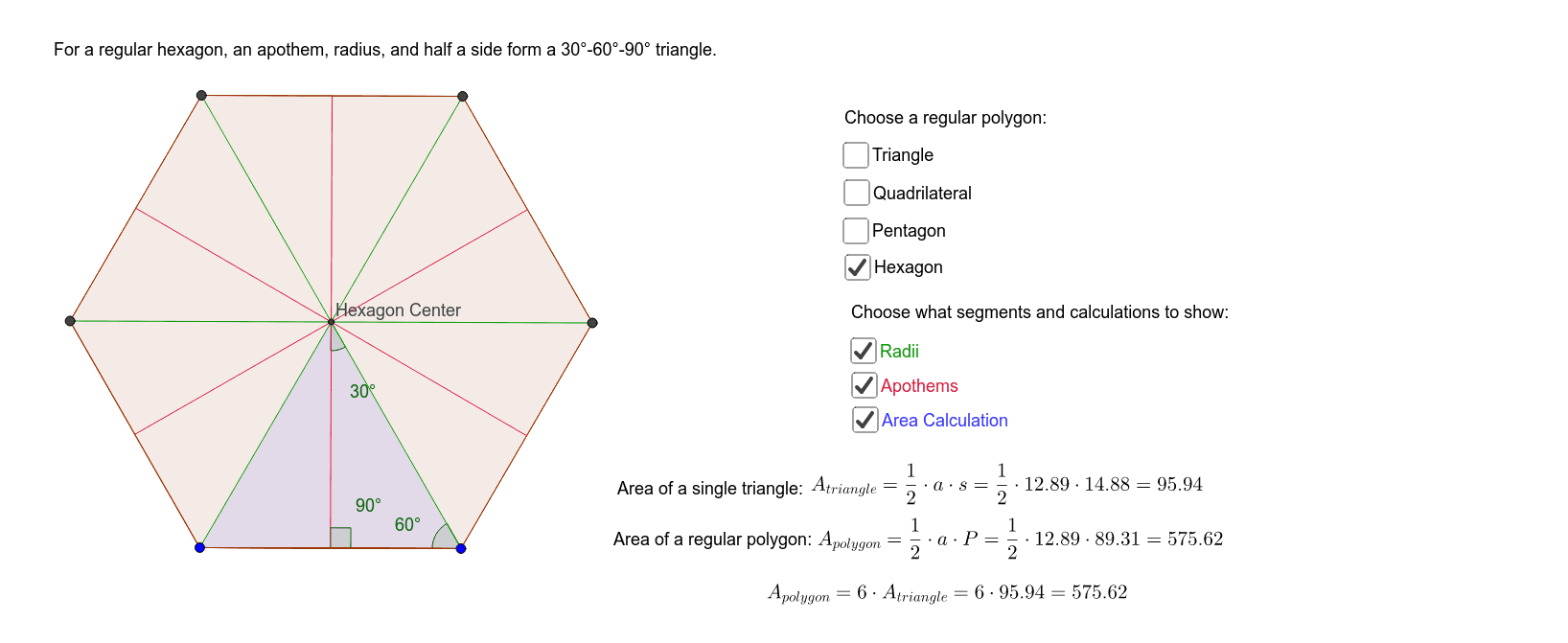
This GeoGebra applet demonstrates regular polygons, their apothems, radii, and area calculations. By constructing regular polygons, midpoints, segments, angle bisectors, intersections, angles, and areas, students can visually understand the properties of regular polygons and their area calculations. Suitable for middle school and above students learning geometry and area calculations.
GeoGebra Commands & Parameters
Polygon(A, B, 5) → poly3, l, m, n, p, f_2, F, G, HMidpoint(f_2) → S_1Segment(S_1, F) → p_3Midpoint(m) → R_1Segment(R_1, H) → n_3Segment(A, B) → aPolygon(A, B, 3) → poly1, b, c, d, CPolygon(A, B, 4) → poly2, f, g, h, i, D, EPolygon(A, B, 6) → poly4, q, L, r, s, t, a_1, b_1, I, J, KMidpoint(a) → MAngularBisector(C, B, A) → c_1AngularBisector(B, A, C) → d_1AngularBisector(A, C, B) → e_1Intersect(e_1, d_1) → NSegment(N, B) → f_1Segment(N, A) → g_1Segment(N, C) → h_1Midpoint(d) → OMidpoint(c) → PSegment(N, P) → i_1Segment(N, O) → j_1Segment(M, N) → k_1Midpoint(a) → QMidpoint(i) → RMidpoint(h) → SMidpoint(g) → TAngularBisector(E, D, B) → l_1AngularBisector(D, B, A) → m_1Intersect(l_1, m_1) → UMidpoint(h) → VMidpoint(i) → WMidpoint(g) → ZMidpoint(a) → A_1Segment(U, Z) → n_1Segment(U, V) → p_1Segment(U, W) → q_1Segment(U, A_1) → r_1Segment(U, B) → s_1Segment(U, D) → t_1Segment(U, E) → a_2Segment(U, A) → b_2Angle(M, N, B) → αAngle(N, B, A) → βAngle(a, k_1) → γAngle(A_1, U, B) → δAngle(U, B, A) → εIntersect(r_1, a) → B_1Angle(B, B_1, U) → ζMidpoint(a) → F_1Midpoint(a_1) → K_1Midpoint(b_1) → L_1Midpoint(a) → M_1Midpoint(r) → N_1Midpoint(s) → O_1Midpoint(t) → P_1AngularBisector(K, J, I) → p_2AngularBisector(J, I, B) → q_2Intersect(q_2, p_2) → Q_1Segment(Q_1, I) → r_2Segment(N_1, Q_1) → s_2Segment(Q_1, B) → t_2Segment(M_1, Q_1) → a_3Segment(Q_1, O_1) → c_3Segment(J, Q_1) → d_3Segment(Q_1, P_1) → e_3Segment(K, Q_1) → f_3Segment(Q_1, K_1) → g_3Segment(L, Q_1) → h_3Segment(Q_1, L_1) → i_3Angle(M_1, Q_1, B) → κAngle(Q_1, B, M_1) → λAngle(B, M_1, Q_1) → μSegment(A, Q_1) → kMidpoint(f_2) → C_1Midpoint(p) → D_1Midpoint(n) → E_1Midpoint(m) → G_1Midpoint(b) → H_1Segment(H_1, G) → g_2Segment(F, C_1) → h_2Intersect(n_3, p_3) → I_1Segment(H_1, I_1) → i_2Segment(I_1, G_1) → j_2Segment(I_1, E_1) → k_2Segment(I_1, D_1) → l_2Segment(I_1, C_1) → m_2Segment(G, I_1) → n_2Segment(I_1, F) → c_2Segment(B, I_1) → d_2Segment(A, I_1) → e_2Segment(H, I_1) → j_3Angle(B, Q, I_1) → ηAngle(Q, I_1, B) → θAngle(I_1, B, Q) → ιMidpoint(b) → J_1Polygon(B, A, N) → poly5, k_3, l_3, m_3Area(poly5) → u_1Perimeter(poly1) → v_1Polygon(A, U, B) → poly6, b_3, a_4, u_2Perimeter(poly6) → o_2Polygon(A, I_1, B) → poly7, b_4, a_5, i_4Perimeter(poly3) → v_2Polygon(A, Q_1, B) → poly8, b_5, a_6, q_3Perimeter(poly4) → w_2
AI Drawing Prompt Reference
Draw a regular pentagon and mark the midpoints of its sides, connecting each midpoint to the corresponding vertex. Then draw a regular triangle and a square, marking the midpoints of their sides and connecting each midpoint to the corresponding vertex. Next, draw a regular hexagon and mark the midpoints of its sides, connecting each midpoint to the corresponding vertex. Finally, draw three angle bisectors that intersect at a point, and draw three line segments from this intersection point to the vertices of the regular triangle.
The prompt above was compiled from the original drawing commands and is for reference only.