
Area of a Circle Approximated by Regular Polygons
Loading the math board and drawing, please wait…
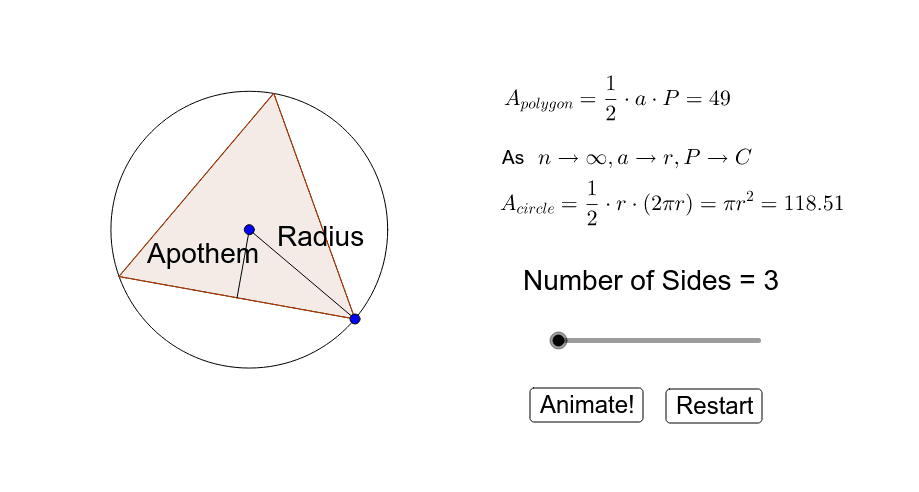
This GeoGebra applet demonstrates that the area of a regular polygon inscribed in a circle approaches the area of the circle as the number of sides increases. Core mathematical concepts include circle area, regular polygon area, limits, and geometric approximation. The construction relies on GeoGebra commands such as Circle, Radius, If, Intersect, Polygon, Segment, Area, and Midpoint, with objects including circle c, radius polyRad, side count numSides, counter, and polygon poly1. A slider controls the number of sides, enabling dynamic visualization of the limiting process. Suitable for middle and high school geometry lessons, calculus limit introductions, classroom demonstrations, and independent student exploration.
GeoGebra Commands & Parameters
Circle(A, B) → cRadius(c) → polyRadIf(numSides < 15, If[numSides < 10, numSides, (numSides * 3)], (numSides * 10)) → counterCircle(B, polySide) → dIntersect(c, d, 2) → CPolygon(C, B, counter) → poly1, f, p, m_5, n_5, p_5, q_5, r_5, s_5, t_5, a_5, b_5, c_5, q, d_5, e_5, f_6, g_6, h_6, i_6, j_6, k_6, l_6, m_6, r, n_6, p_6, q_6, r_6, s_6, t_6, a_6, b_6, c_6, d_6, s, e_6, f_7, g_7, h_7, i_7, j_7, k_7, l_7, m_7, n_7, t, p_7, q_7, r_7, s_7, t_7, a_7, b_7, c_7, d_7, e_7, a, f_8, g_8, h_8, i_8, j_8, k_8, l_8, m_8, n_8, p_8, b, q_8, r_8, s_8, t_8, a_8, b_8, c_8, d_8, e_8, f_9, e, g_9, h_9, i_9, j_9, k_9, l_9, m_9, n_9, p_9, q_9, f_1, r_9, D, E, F, G, H, I, J, K, L, g_1, M, N, O, P, Q, R, S, T, U, V, g, h_1, W, Z, A_1, B_1, C_1, D_1, E_1, F_1, G_1, H_1, i_1, I_1, J_1, K_1, L_1, M_1, N_1, O_1, P_1, Q_1, R_1, j_1, S_1, T_1, U_1, V_1, W_1, Z_1, A_2, B_2, C_2, D_2, k_1, E_2, F_2, G_2, H_2, I_2, J_2, K_2, L_2, M_2, N_2, l_1, O_2, P_2, Q_2, R_2, S_2, T_2, U_2, V_2, W_2, Z_2, m_1, A_3, B_3, C_3, D_3, E_3, F_3, G_3, H_3, I_3, J_3, n_1, K_3, L_3, M_3, N_3, O_3, P_3, Q_3, R_3, S_3, T_3, p_1, U_3, V_3, W_3, Z_3, A_4, B_4, C_4, D_4, E_4, F_4, q_1, G_4, H_4, I_4, J_4, K_4, L_4, M_4, N_4, O_4, P_4, r_1, Q_4, R_4, S_4, T_4, U_4, V_4, W_4, Z_4, A_5, B_5, h, s_1, C_5, D_5, E_5, F_5, G_5, H_5, I_5, J_5, K_5, L_5, a_1, M_5, N_5, O_5, P_5, Q_5, R_5, S_5, T_5, U_5, V_5, b_1, W_5, Z_5, A_6, B_6, C_6, D_6, E_6, F_6, G_6, H_6, c_1, I_6, J_6, K_6, L_6, M_6, N_6, O_6, P_6, Q_6, R_6, d_1, S_6, T_6, U_6, V_6, W_6, Z_6, A_7, B_7, C_7, D_7, e_1, E_7, F_7, G_7, H_7, I_7, J_7, K_7, L_7, M_7, f_2, g_2, h_2, i_2, i, j_2, k_2, l_2, m_2, n_2, p_2, q_2, r_2, s_2, t_2, j, a_2, b_2, c_2, d_2, e_2, f_3, g_3, h_3, i_3, j_3, k, k_3, l_3, m_3, n_3, p_3, q_3, r_3, s_3, t_3, a_3, l, b_3, c_3, d_3, e_3, f_4, g_4, h_4, i_4, j_4, k_4, m, l_4, m_4, n_4, p_4, q_4, r_4, s_4, t_4, a_4, b_4, n, c_4, d_4, e_4, f_5, g_5, h_5, i_5, j_5, k_5, l_5Segment(A, B) → t_1Area(c) → oMidpoint(f) → N_7Segment(A, N_7) → s_9
AI Drawing Prompt Reference
Draw a circle with center A and radius AB. Inside the circle, construct a regular polygon whose vertices start from a point C on the circle and another point B, using a slider to set the number of sides. As the slider changes, the polygon is redrawn with the specified number of sides, illustrating how the polygon increasingly approximates the circle as the side count grows. Display the area of the circle. Also draw a segment from the circle's center to the midpoint of one of the polygon's vertices.
The prompt above was compiled from the original drawing commands and is for reference only.