
Archimedes Inscribed Polygons Approximating a Circle
Loading the math board and drawing, please wait…
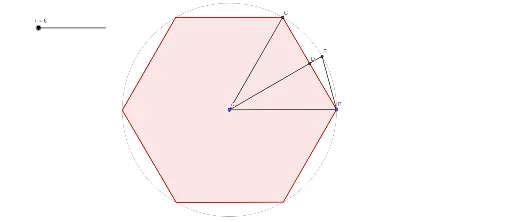
This GeoGebra example demonstrates Archimedes' classical method of approximating the circumference of a circle using inscribed regular polygons. As the number of sides increases, the polygon's perimeter approaches the circle's circumference, illustrating the concept of limits and the approximation of π. Core mathematical concepts include regular polygon geometry, circumference, and limiting processes. The construction uses GeoGebra commands such as Circle to create the base circle, Rotate to generate vertices, Polygon to form the polygon, Segment for edges, OrthogonalLine and Intersect for auxiliary constructions, and Distance to measure side lengths and perimeter. A slider n controls the number of sides, allowing dynamic exploration. This is suitable for middle school, high school, or college mathematics courses, especially for teaching limits and historical approaches to π.
GeoGebra Commands & Parameters
Circle(A, B) → cRotate(B, (360 / n)°, A) → B'Polygon(B, B', n) → poly1, f, q, F, G, H, I, J, K, L, M, N, O, r, P, Q, R, S, T, U, V, W, Z, A_1, s, B_1, C_1, D_1, E_1, F_1, G_1, H_1, I_1, J_1, K_1, t, L_1, M_1, N_1, O_1, P_1, Q_1, R_1, S_1, T_1, U_1, a, V_1, W_1, Z_1, A_2, B_2, C_2, D_2, E_2, F_2, G_2, b, H_2, I_2, J_2, K_2, L_2, M_2, N_2, O_2, P_2, Q_2, d, R_2, S_2, T_2, U_2, V_2, W_2, Z_2, A_3, B_3, C_3, e, D_3, E_3, F_3, G_3, H_3, I_3, J_3, K_3, L_3, M_3, f_1, N_3, O_3, P_3, Q_3, R_3, S_3, T_3, U_3, V_3, W_3, g_1, Z_3, g, h_1, i_1, j_1, k_1, l_1, m_1, n_1, p_1, q_1, r_1, h, s_1, t_1, a_1, b_1, c_1, d_1, e_1, f_2, g_2, h_2, i, i_2, j_2, k_2, l_2, m_2, n_2, p_2, q_2, r_2, s_2, j, t_2, a_2, b_2, c_2, d_2, e_2, f_3, g_3, h_3, i_3, k, j_3, k_3, l_3, m_3, n_3, p_3, q_3, r_3, s_3, t_3, l, a_3, b_3, c_3, d_3, e_3, f_4, g_4, h_4, i_4, j_4, m, k_4, l_4, m_4, n_4, p_4, q_4, r_4, s_4, t_4, a_4, p, b_4, c_4, d_4, e_4, f_5, g_5, h_5, C_4, D_4, E_4Segment(A, B') → i_5Segment(A, B) → j_5OrthogonalLine(A, f) → k_5Intersect(c, k_5, 1) → EIntersect(k_5, f) → DSegment(A, D) → l_5Segment(D, E) → m_5Segment(E, B) → n_5Distance(D, E) → CDIntersect(c, f, 2) → C
AI Drawing Prompt Reference
Draw a circle with a center point and a point on its circumference. Rotate the circumference point around the center by a fixed angle to generate vertices of a regular polygon, then connect adjacent vertices with line segments to form an inscribed polygon. Use a slider to control the number of sides, so the polygon approaches the circle as sides increase. From the center, draw a perpendicular line to one side of the polygon; mark its intersection with the side and the circle, and measure the distance between these two intersection points to illustrate the relationship between polygon perimeter and circle circumference.
The prompt above was compiled from the original drawing commands and is for reference only.