
Area of Inscribed Polygons vs Circles
Loading the math board and drawing, please wait…
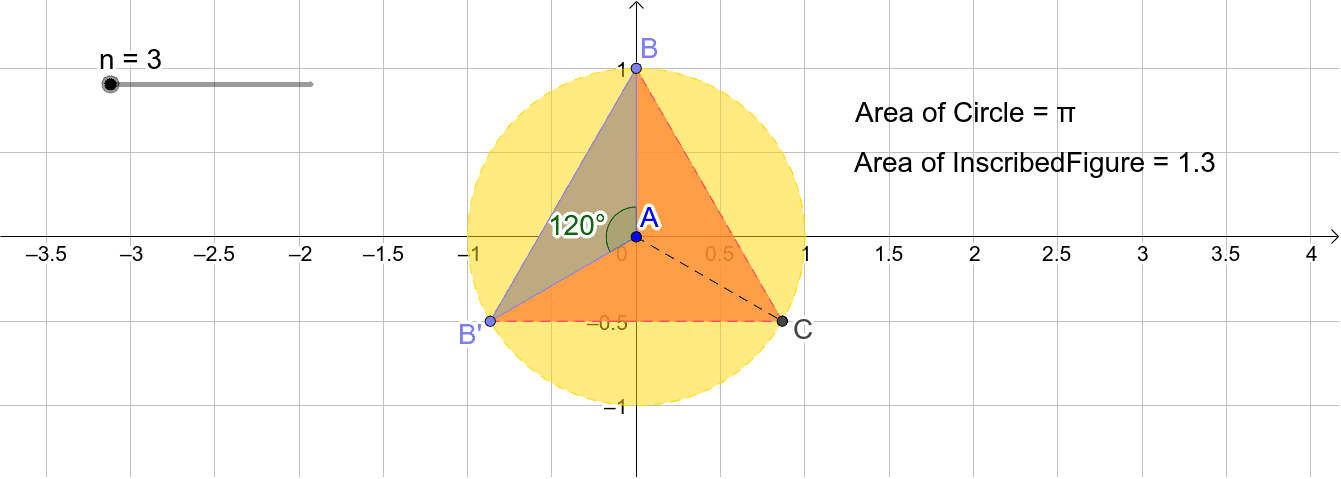
①This example dynamically demonstrates how the area of a regular polygon inscribed in a circle approaches the circle's area as the number of sides increases, controlled by a slider. ②Core mathematical concepts include polygon area formulas, circle area, the limit concept, and the relationship between inscribed polygons and circles, with auxiliary use of arithmetic mean and cosine. ③Construction: Using GeoGebra commands such as Circle, Point, Rotate, Angle, Polygon, PointIn, Area, and Segment, the applet builds a circle, rotates points to generate polygon vertices, and computes areas; objects include A, Circle, n, B, B', α, InscribedFigure, and multiple auxiliary segments and area objects. ④Suitable for middle/high school geometry and introductory calculus, this example helps students visualize limits and approximation, and explore the connection between polygon area and π.
GeoGebra Commands & Parameters
Circle(A, 1) → CirclePoint(Circle) → BRotate(B, (360 / n)°, A) → B'Angle(B, A, B') → αPolygon(B, B', n) → InscribedFigure, f, q, m_5, C, D, E, F, G, H, I, J, K, r, L, M, N, O, P, Q, R, S, T, U, s, V, W, Z, A_1, B_1, C_1, D_1, E_1, F_1, G_1, t, H_1, I_1, J_1, K_1, L_1, M_1, N_1, O_1, P_1, Q_1, a, R_1, S_1, T_1, U_1, V_1, W_1, Z_1, A_2, B_2, C_2, b, D_2, E_2, F_2, G_2, H_2, I_2, J_2, K_2, L_2, M_2, d, N_2, O_2, P_2, Q_2, R_2, S_2, T_2, U_2, V_2, W_2, e, Z_2, A_3, B_3, C_3, D_3, E_3, F_3, G_3, H_3, I_3, f_1, J_3, K_3, L_3, M_3, N_3, O_3, P_3, Q_3, R_3, S_3, g_1, T_3, U_3, V_3, W_3, Z_3, A_4, B_4, C_4, D_4, g, h_1, i_1, j_1, k_1, l_1, m_1, n_1, p_1, q_1, r_1, h, s_1, c, t_1, c_1, d_1, e_1, f_2, g_2, h_2, i_2, i, j_2, k_2, l_2, m_2, n_2, p_2, q_2, r_2, s_2, t_2, j, a_2, b_2, c_2, d_2, e_2, f_3, g_3, h_3, i_3, j_3, k, k_3, l_3, m_3, n_3, p_3, q_3, r_3, s_3, t_3, a_3, l, b_3, c_3, d_3, e_3, f_4, g_4, h_4, i_4, j_4, k_4, m, l_4, m_4, n_4, p_4, q_4, r_4, s_4, t_4, a_4, b_4, p, c_4, d_4, e_4, f_5, g_5, h_5, i_5, j_5, k_5, l_5PointIn(InscribedFigure) → Pointpoly1Area(Circle) → oPointIn(Circle) → PointcPolygon(B, A, B') → poly1, b', b_1, a_1Segment(A, C) → n_5