
Regular Octahedron with Edge 5 (Volume)
Loading the math board and drawing, please wait…
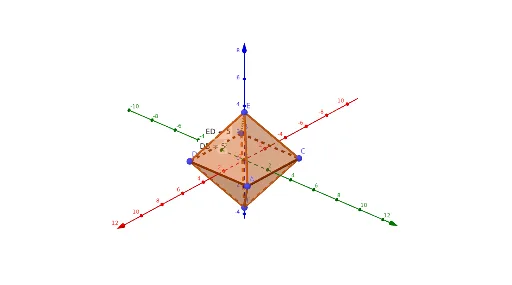
① This example demonstrates the 3D construction of a regular octahedron with edge length 5 in GeoGebra, and computes its volume in real time. ② The core mathematical concepts include the geometric properties of a regular octahedron, the volume formula V = (√2/3)a³, and the relationships among vertices, edges, and faces of a polyhedron. ③ Construction highlights: the Distance command measures edge lengths, Polygon builds triangular faces, Pyramid creates two square-based pyramids that combine to form the octahedron, Volume calculates the volume, and auxiliary points are placed using PointIn and Midpoint; objects include vertices A–F, edges (edgeCE, edgeAE, etc.), faces (faceACE, faceADE, etc.), and volume text objects volumee and volumef. ④ This is suitable for middle/high school solid geometry lessons or introductory college geometry, helping students intuitively understand the structure and volume calculation of a regular octahedron.
GeoGebra Commands & Parameters
Distance(E, D) → distanceEDDistance(E, C) → distanceECDistance(E, B) → distanceEBDistance(E, A) → distanceEAPolygon(C, A, D, B) → q1, c, a, d, bPyramid(q1, E) → e, faceACE, faceADE, faceBDE, faceBCE, edgeCE, edgeAE, edgeDE, edgeBEPyramid(q1, F) → f, faceACF, faceADF, faceBDF, faceBCF, edgeCF, edgeAF, edgeDF, edgeBFVolume(e) → volumeePointIn(e) → PointeVolume(f) → volumefPointIn(f) → PointfDistance(D, B) → distanceDBMidpoint(D, B) →
AI Drawing Prompt Reference
Draw a regular octahedron with edge length 5 and calculate its volume in real time. Construct two square-based pyramids that combine to form the octahedron. Use the distance command to measure edges, polygon tool to create triangular faces, and label key points, edges, and faces. Finally, calculate and display the volumes of the two pyramids, and use auxiliary point tools to locate helper points.
The prompt above was compiled from the original drawing commands and is for reference only.