
Refraction by Different Single Surfaces
Loading the math board and drawing, please wait…
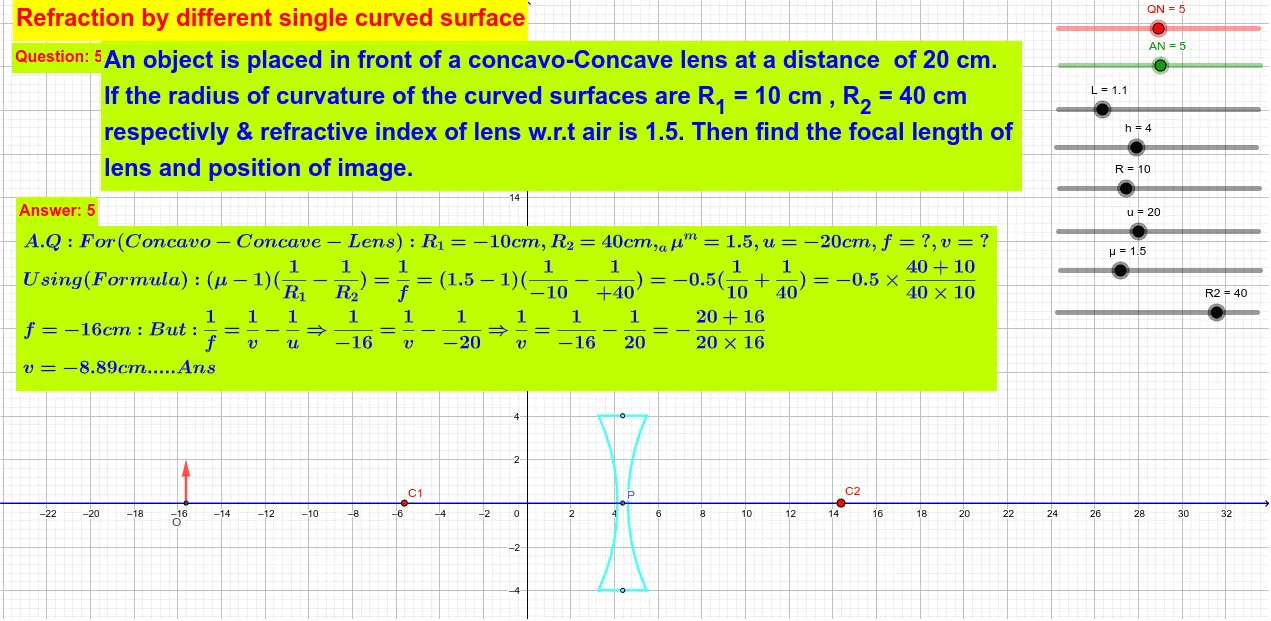
This example demonstrates refraction phenomena across different single surfaces, involving the principles of refraction and geometric construction. Key construction steps include using GeoGebra commands such as Line, CircleArc, and Segment to create refraction paths. Suitable for high school students or college freshmen learning geometric optics and function graphing.
GeoGebra Commands & Parameters
Line(P, C1) → fCircleArc(C1, B, A) → cSegment(A, B) → gCircleArc(C2, A, B) → dIntersect(f, xAxis) → CIntersect(f, xAxis) → DIntersect(f, xAxis) → EIntersect(f, xAxis) → FIntersect(d, f) → G,Line(A, f) → iLine(B, f) → jOrthogonalLine(G, f) → kIntersect(i, k) → HIntersect(k, j) → ISegment(H, I) → lSegment(H, A) → mSegment(I, B) → nVector(O, O') → vLine(O', f) → pIntersect(c, g, 2) → MCircleArc(C2, A, B) → eCircleArc(C3, A, B) → qCircleArc(C2, A, B) → rCircleArc(C1, B, A) → sCircleArc(C2, A1, B1) → tCircleArc(C1, B2, A2) → c_1Segment(A2, A1) → aSegment(B2, B1) → b
AI Drawing Prompt Reference
Create a geometric illustration of light refraction. Draw an incident light ray from the left side intersecting a horizontal axis. Use circular arcs to represent curved refractive surfaces connecting two endpoints. Mark the intersection point between the incident ray and the arc. From this point, draw perpendicular lines to the incident ray, and from the endpoints draw additional lines intersecting to form the refracted light path. Connect the relevant points with line segments to complete the light propagation path, demonstrating how light bends when passing from one medium to another.
The prompt above was compiled from the original drawing commands and is for reference only.