
Reflections, Rotations, Dilations, and Translations by Robyn Porter
Loading the math board and drawing, please wait…
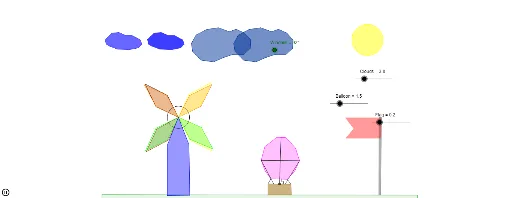
This example demonstrates fundamental geometric transformations in a 2D plane, including reflections, rotations, dilations, and translations. Key math concepts involve transformations, vectors, coordinate geometry, and polygon area calculations. It leverages GeoGebra commands like Intersect, Point, Circle, Segment, Polygon, Rotate, Vector, Translate, Mirror, and Dilate, as outlined in the construction summary. Suitable for middle school and above students to learn and understand the properties and applications of geometric transformations.
GeoGebra Commands & Parameters
Intersect(xAxis, yAxis) → APoint(yAxis) → BCircle(A, B) → cSegment(A, C) → aSegment(C, D) → bSegment(D, E) → dSegment(E, A) → ePolygon(A, C, D, E) → poly1, a_1, c_1, d_1, e_1Rotate(A, Windmill, A) → A'Rotate(C, Windmill, A) → C'Rotate(D, Windmill, A) → D'Rotate(E, Windmill, A) → E'Polygon(A', C', D', E') → poly1', a', c', d', e'Polygon(A, F, G, H) → poly2, a_2, f, g, hPolygon(A, I, J, K) → poly3, a_3, i, j, kPolygon(A, L, M, N) → poly4, a_4, l, m, nRotate(A, Windmill, A) → A'_1Rotate(F, Windmill, A) → F'Rotate(G, Windmill, A) → G'Rotate(H, Windmill, A) → H'Polygon(A'_1, F', G', H') → poly2', a'_1, f', g', h'Rotate(A, Windmill, A) → A'_2Rotate(I, Windmill, A) → I'Rotate(J, Windmill, A) → J'Rotate(K, Windmill, A) → K'Polygon(A'_2, I', J', K') → poly3', a'_2, i', j', k'Rotate(A, Windmill, A) → A'_3Rotate(L, Windmill, A) → L'Rotate(M, Windmill, A) → M'Rotate(N, Windmill, A) → N'Polygon(A'_3, L', M', N') → poly4', a'_3, l', m', n'Polygon(A, O, P, Q, R) → poly5, a_5, o, p, q, r_3Polygon(S, T, U, V) → poly6, s, t, u, vCircle(W, Z) → f_1Polygon(A_1, B_1, K_1, L_1, C_1, D_1, E_1, F_1, G_1, H_1, I_1, J_1) → poly7, a_6, j_1, k_1, l_1, b_1, c_2, d_2, e_2, f_2, g_1, h_1, i_1Polygon(M_1, N_1, W_1, Z_1, A_2, B_2, C_2, O_1, P_1, Q_1, R_1, S_1, T_1, U_1, V_1) → poly8, m_1, v_1, w_1, z_1, a_7, b_2, c_3, n_1, o_1, p_1, q_1, r_1, s_1, t_1, u_1Point(Circle[A, Clouds]) → E_2Segment(A, E_2) → g_2Vector(A, E_2) → zTranslate(A_1, z) → F_2Translate(B_1, z) → G_2Translate(C_1, z) → H_2Translate(D_1, z) → I_2Translate(E_1, z) → J_2Translate(F_1, z) → K_2Translate(G_1, z) → L_2Translate(H_1, z) → M_2Translate(I_1, z) → N_2Translate(J_1, z) → O_2Translate(K_1, z) → P_2Translate(L_1, z) → Q_2Polygon(F_2, G_2, P_2, Q_2, H_2, I_2, J_2, K_2, L_2, M_2, N_2, O_2) → poly7', f_3, o_2, p_2, q_2, g_3, h_2, i_2, j_2, k_2, l_2, m_2, n_2Translate(M_1, z) → R_2Translate(N_1, z) → S_2Translate(O_1, z) → T_2Translate(P_1, z) → U_2Translate(Q_1, z) → V_2Translate(R_1, z) → W_2Translate(S_1, z) → Z_2Translate(T_1, z) → A_3Translate(U_1, z) → B_3Translate(V_1, z) → C_3Translate(W_1, z) → D_3Translate(Z_1, z) → E_3Translate(A_2, z) → F_3Translate(B_2, z) → G_3Translate(C_2, z) → H_3Polygon(R_2, S_2, D_3, E_3, F_3, G_3, H_3, T_2, U_2, V_2, W_2, Z_2, A_3, B_3, C_3) → poly8', r_2, c_4, d_3, e_3, f_4, g_4, h_3, s_2, t_2, u_2, v_2, w_2, z_2, a_8, b_3Point(s) → D_2Point(s) → I_4Polygon(D_2, G_4, H_4, I_4) → poly12, d_5, g_5, h_4, i_4Point(h_4) → M_4Polygon(H_4, J_4, K_4, L_4, M_4) → poly13, h_5, j_4, k_4, l_5, m_4Mirror(H_4, h_4) → N_4Mirror(J_4, h_4) → O_4Mirror(K_4, h_4) → P_4Mirror(L_4, h_4) → Q_4Mirror(M_4, h_4) → R_4Polygon(N_4, O_4, P_4, Q_4, R_4) → poly13', n_4, o_4, p_3, q_4, r_4Point(s) → T_4Point(s) → U_4Polygon(S_4, T_4, U_4, V_4) → poly14, s_4, t_4, u_4, v_4Polygon(W_4, Z_4, A_5, B_5, C_5, D_5, E_5, F_5, G_5, H_5) → poly15, w_4, h_6, z_4, a_{10}, b_5, c_6, d_6, e_5, f_6, g_6Point(h_6) → I_5Dilate(W_4, Balloon, I_5) → J_5Dilate(Z_4, Balloon, I_5) → K_5Dilate(A_5, Balloon, I_5) → L_5Dilate(B_5, Balloon, I_5) → M_5Dilate(C_5, Balloon, I_5) → N_5Dilate(D_5, Balloon, I_5) → O_5Dilate(E_5, Balloon, I_5) → P_5Dilate(F_5, Balloon, I_5) → Q_5Dilate(G_5, Balloon, I_5) → R_5Dilate(H_5, Balloon, I_5) → S_5Polygon(J_5, K_5, L_5, M_5, N_5, O_5, P_5, Q_5, R_5, S_5) → poly15', j_5, s_5, k_5, l_6, m_5, n_5, o_5, p_5, q_5, r_5Segment(S_4, J_5) → b_6Segment(V_4, S_5) → e_6Point(n_5) → V_5Segment(L_5, Q_5) → j_6Midpoint(v_4) → I_3Point(v_4) → J_3Point(v_4) → K_3Segment(L_5, J_3) → i_3Segment(I_3, V_5) → j_3Segment(K_3, Q_5) → k_3
AI Drawing Prompt Reference
Draw a 2D coordinate plane with intersecting axes and mark their intersection point. Create a circle centered at this point and draw a polygon on the circle. Then, rotate, reflect, translate, and dilate the polygon around the origin to generate transformed versions. Finally, combine all original and transformed shapes to demonstrate the effects of various geometric transformations.
The prompt above was compiled from the original drawing commands and is for reference only.