
Ellipse and Polygon Geometric Construction with Vector Transformation
Loading the math board and drawing, please wait…
In collections
geometriadinamica.es
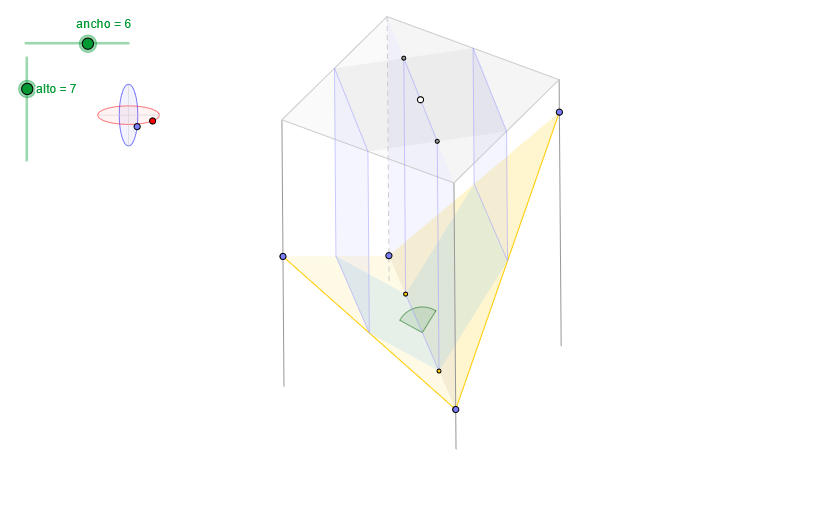
This example demonstrates how to construct a composite figure involving ellipses and polygons using GeoGebra with vector translation transformations. The core mathematical concepts include ellipse equations, quadratic function graphs, polygon area calculation, and the geometric meaning of vector translation. Construction points: Use the Ellipse command to draw ellipses, Circle command for auxiliary circles, Polygon command to construct polygons, Vector and Translate commands for figure translation, Sequence and Element commands to generate point sequences, Angle command to measure angles, and Midpoint command to determine midpoints. This example is suitable for teaching coordinate geometry, vector operations, and geometric transformations in secondary school mathematics courses, serving as a visualization tool for students to understand the relationship between coordinate geometry and vector transformations, and can also be used for exploratory learning about the relationship between quadratic curves and polygons.
GeoGebra Commands & Parameters
OrthogonalLine(C, xAxis) → z2Circle(C, 0.62) → z0Intersect(z0, z2, 1) → Z4Intersect(z0, z2, 2) → Z3Ellipse(Z3, Z4, 0.65) → zElipse2Point(zElipse2) → ZIntersect(zElipse2, z2) → Z7, Z8Angle(Z8, C, Z) → zAngIncOrthogonalLine(C, yAxis) → z1Intersect(z0, z1, 2) → Z2Intersect(z0, z1, 1) → Z1Ellipse(Z1, Z2, 0.65) → zElipse1Point(zElipse1) → XYTranslate((0, 0), v) → OOrthogonalLine(O, yAxis) → dPoint(d) → GVector((0, 0), G) → wSequence(PuntoEsfera[C, XY, Z, radio, 0, (s * α)], s, 0, n) → puntosASequence((x(w) + x(Element[puntosA, s]), y(w) + y(Element[puntosA, s])), s, 1, n + 1) → puntosBSequence(Segment[Element[puntosB, s], Element[puntosA, s]], s, 1, n) → aristasElement(aristas, 4) → a4Point(a4) → EElement(aristas, 3) → a3Point(a3) → DElement(aristas, 2) → a2Point(a2) → BElement(aristas, 1) → a1Point(a1) → AElement(puntosB, 4) → B4Element(puntosB, 3) → B3Element(puntosB, 2) → B2Element(puntosB, 1) → B1Intersect(zElipse1, z1) → Z5, Z6Segment(Z5, Z6) → z4Segment(Z7, Z8) → z3Intersect(zElipse2, zElipse1, 1) → zPunto1Intersect(zElipse2, zElipse1, 4) → zPunto2Segment(zPunto1, zPunto2) → zSeg2Polygon(B1, B2, B3, B4) → poly2, a, b, c, eAngle(Z6, C, XY) → zAngRotSequence(Angle[Element[puntosB, s + 1], Element[puntosB, s], Element[puntosA, s + 1]], s, 1, n) → angulosSequence(If[s > 1 ∧ Element[angulos, s - 1] > 180° ∧ Element[angulos, s] > 180°, false, If[s ≟ 1 ∧ Element[angulos, n] > 180° ∧ Element[angulos, s] > 180°, false, true]], s, 1, n) → aristasVisiblesElement(aristas, 1) → a1bElement(aristas, 2) → a2bPolygon(A, B, D, E) → poly1, f, g, h, iElement(aristas, 3) → a3bSequence(If[Element[angulos, s] > 180°, false, true], s, 1, n) → carasVisiblesAngle(B1, B2, B3) → βElement(aristas, 4) → a4bPolygon(A, D, B) → poly3, b_1, a_1, d_1Polygon(B1, B3, B2) → poly4, b2, b1, b3Polygon(B1, A, D, B3) → poly5, b1_1, a_2, d_2, b3_1Midpoint(A, D) → IAngle(H, I, F) → γMidpoint(e) → JMidpoint(a) → KMidpoint(b) → LMidpoint(c) → MMidpoint(h) → NMidpoint(g) → PMidpoint(f) → QMidpoint(i) → RSegment(A, D) → jMidpoint(J, K) → SMidpoint(M, L) → TLine(S, a2) → kLine(T, a2) → lIntersect(j, k) → UIntersect(j, l) → VSegment(S, U) → mSegment(T, V) → pPolygon(R, U, V, N) → poly6, r, u_1, v_1, n_1Polygon(U, Q, P, V) → poly7, u_2, q, p_1, v_2Polygon(J, S, T, M) → poly8, j_1, s, t, m_1Polygon(S, K, L, T) → poly9, s_1, k_1, l_1, t_1Polygon(J, R, N, M) → poly10, j_2, r_1, n_2, m_2Polygon(K, Q, P, L) → poly11, k_2, q_1, p_2, l_2
AI Drawing Prompt Reference
Draw a composite figure involving two ellipses, multiple auxiliary circles, a polygon, and several line segments. The two ellipses have their centers at the origin and the center of an auxiliary circle, with their major axes parallel to the coordinate axes. The polygon's vertices are determined by the intersection points of the two ellipses and the center of the auxiliary circle, and its edges are connected by the intersection points and the center of the auxiliary circle. The figure also includes several line segments representing the major axes of the ellipses, the radius of the auxiliary circle, and the edges of the polygon.
The prompt above was compiled from the original drawing commands and is for reference only.