
Reflection: Resultant Vector
Loading the math board and drawing, please wait…
In collections
Light
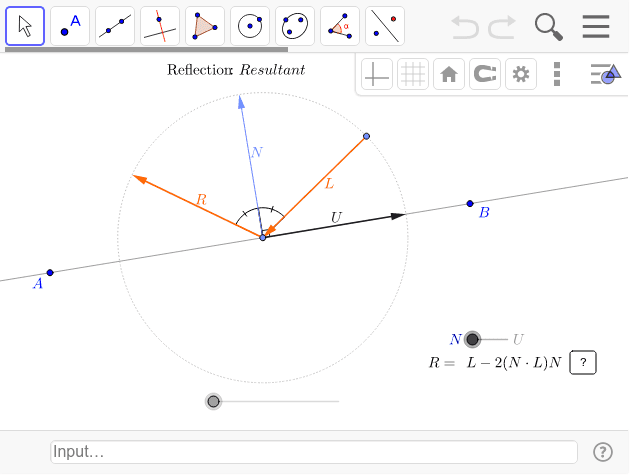
This example demonstrates the reflection of a ray off a line. Key mathematical concepts include vectors and reflection. Using GeoGebra commands such as Vector, Line, and UnitVector, the reflected direction vector can be constructed. Suitable for high school mathematics education and learning reflection principles.
GeoGebra Commands & Parameters
Vector(A, B) → ABLine(A, B) → l1UnitVector(AB) → ULine(A, U) → l1'Point(l1') → CVector((ί * U)) → NAngle(B, C, C + N) → αCurveCartesian(x(C + (cos(t) * U) + (sin(t) * N)), y(C + (cos(t) * U) + (sin(t) * N)), t, -3.141592653589793, 3.141592653589793) → aCircle(C, 1) → cPoint(a) → DVector(D, C) → Lsign2(((-L) * N)) → σAngle(D, C, C + (σ * N)) → λAngle(C + (σ * N), C, C + R) → λ'If(dex ≟ 1, 1, -1) → σ2If(lerp ≥ 7, 4, If[lerp ≥ 6, 3, If[lerp ≥ 4, 2, 1]]) → hIf(lerp ≥ 15, 4, If[lerp ≥ 14, 3, If[lerp ≥ 13, 2, 1]]) → h2Vector(C, C + L) → uAngle(C + L_u, C, C + R) → β'Angle(C + L_u, C, C + L) → βIf(dex ≟ 1, Vector[(((-N) * L) * N)], Vector[((U * L) * U)]) → wIf(lerp ≤ 12, C - L, If[lerp ≤ 13, C - L + L_u, C + L + (2 * L_u)]) → F2If(lerp ≤ 12, C + L, If[lerp ≤ 13, C + L - L_N, C + L - (2 * L_N)]) → E
AI Drawing Prompt Reference
Draw a straight line and a ray to demonstrate the reflection of the ray off the line. First, sketch the ray and the line, then determine the direction vector of the ray and compute its unit vector. Use the unit vector to construct the reflection line and locate the reflection point. Next, draw the reflected ray direction and represent the reflection path with a curve. Finally, add auxiliary circles and vectors to illustrate the key angles and vector relationships during the reflection process.
The prompt above was compiled from the original drawing commands and is for reference only.