
Reflection Plane of a Cube
Loading the math board and drawing, please wait…
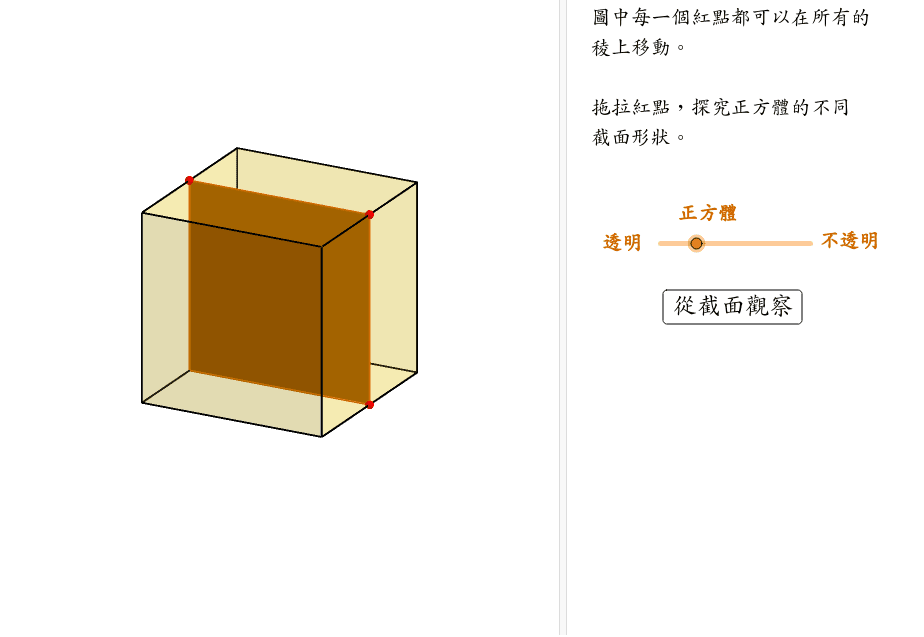
This example demonstrates the reflection plane of a cube, showcasing symmetry and involving core concepts in solid geometry and reflection transformations. It is constructed using GeoGebra commands like Cube, Polygon, PointIn, Translate, Rotate, Point, Plane, IntersectPath, and OrthogonalLine, making it suitable for high school geometry education and constructions.
GeoGebra Commands & Parameters
Cube((-1.5, -1.5, 0), (1.5, -1.5, 0), xOyPlane) → m, M, face4, face5, face6, edge1, edge2, edge3, edge4, edge5, edge6, edge7, N, edge8, edge9, edge10, edge11, edge12, Q, R, S, T, face1, face2, face3Polygon(B + ((-2), (-2)), B + (2, (-2)), B + (2, 2), B + ((-2), 2)) → poly3, e, f, g, iPointIn(poly3) → CTranslate((0, 0, 0), Vector[B, C]) → APolygon(A + ((-4), (-4)), A + (4, (-4)), A + (4, 4), A + ((-4), 4)) → poly1, a, b, c, dRotate(Rotate[Translate[poly1, Vector[A, A + (0, 0, h)]], (90° * s), A + (0, 0, h), yAxis], (90° * t), A, zAxis) → poly2Rotate(D, 120*°, (0, 0, 0)) → EPolygon(D, E, 3, xOyPlane) → poly4, j, k, l, FPoint(list1) → GPoint(list2) → HPoint(list3) → IPlane(G, I, H) → nIntersectPath(n, m) → poly6, poly5, V, p, q, r, a_1, b_1, c_1, e_1, f_1, poly7, K, L_1, O, P, J, L, URotate(m, 0, zAxis) → m'Rotate(m, 0, zAxis) → m'_1OrthogonalLine(A, n) → d_1
AI Drawing Prompt Reference
Draw a cube and its reflection plane. Start by constructing the cube, then create a polygon with four points and find a point on it. Next, generate new polygons using vector translation and rotation. Use rotations and reflections to create multiple symmetric polygons and points. Finally, determine a plane through three points and find its intersection with the cube, while drawing a line orthogonal to the plane to showcase symmetry and reflection transformations.
The prompt above was compiled from the original drawing commands and is for reference only.