
Reflection over Non-Concurrent Lines
Loading the math board and drawing, please wait…
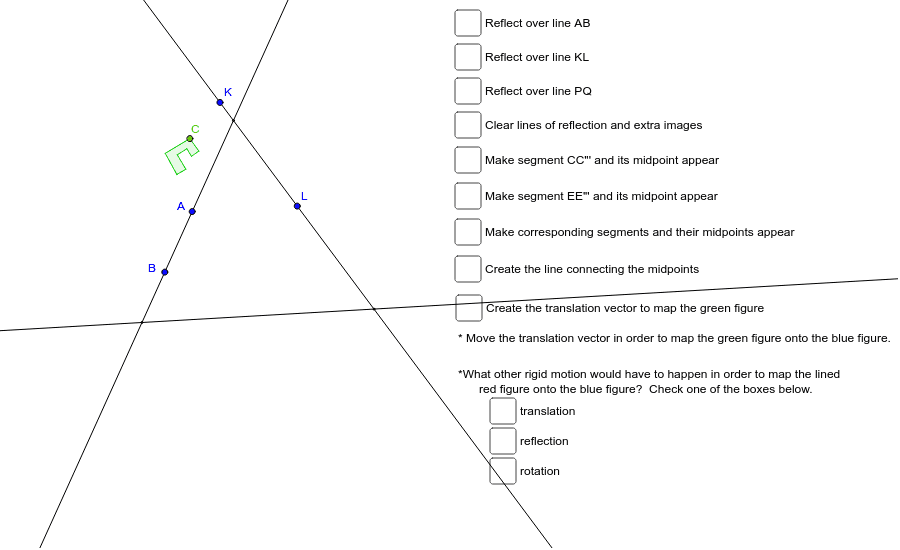
This example demonstrates the geometric transformation of reflecting a polygon over a set of non-concurrent lines (lines that do not all intersect at a single point). The core mathematical concepts include reflection (axial symmetry), properties of non-concurrent lines, and the congruence between the original and reflected figures. Construction details: using GeoGebra commands such as Line, Point, Polygon, Mirror, Segment, Distance, Intersect, Angle, Midpoint, Vector, and Translate to construct the original polygon, the reflection axes, and the reflected image, along with measurements and verifications. Suitable for middle and high school geometry classes to explore how reflection works when axes are not concurrent and how the position of the image changes accordingly.
GeoGebra Commands & Parameters
Line(A, B) → R1Point(Circle[C, 5.548885023137532]) → DPolygon(C, D, E, F, G, H, I, J) → poly1, c, d, e, f, g, h, i, jMirror(C, R1) → C'Mirror(D, R1) → D'Mirror(E, R1) → E'Mirror(F, R1) → F'Mirror(G, R1) → G'Mirror(H, R1) → H'Mirror(I, R1) → I'Mirror(J, R1) → J'Polygon(C', D', E', F', G', H', I', J') → poly1', c', d', e', f', g', h', i', j'Segment(C, C') → lSegment(D, D') → mDistance(C, C') → distanceCC'Distance(E, E') → distanceEE'Distance(F, F') → distanceFF'Line(K, L) → kMirror(C', k) → C''Mirror(D', k) → D''Mirror(E', k) → E''Mirror(F', k) → F''Mirror(G', k) → G''Mirror(H', k) → H''Mirror(I', k) → I''Mirror(J', k) → J''Polygon(C'', D'', E'', F'', G'', H'', I'', J'') → poly1'', c'', d'', e'', f'', g'', h'', i'', j''Intersect(R1, k) → M_1Angle(C, M_1, C'') → βAngle(J, M_1, J'') → γAngle(I, M_1, I'') → δAngle(H, M_1, H'') → εAngle(G, M_1, G'') → ζAngle(F, M_1, F'') → ηAngle(E, M_1, E'') → θAngle(D, M_1, D'') → ιPoint(R1) → PPoint(k) → QLine(P, Q) → f_1Mirror(C'', f_1) → C'''Mirror(D'', f_1) → D'''Mirror(E'', f_1) → E'''Mirror(F'', f_1) → F'''Mirror(G'', f_1) → G'''Mirror(H'', f_1) → H'''Mirror(I'', f_1) → I'''Mirror(J'', f_1) → J'''Polygon(C''', D''', E''', F''', G''', H''', I''', J''') → poly1''', c''', d''', e''', f''', g''', h''', i''', j'''Segment(C, C''') → g_1Midpoint(g_1) → RSegment(E, E''') → j_1Midpoint(j_1) → TSegment(D, D''') → i_1Midpoint(i_1) → SSegment(F, F''') → k_1Midpoint(k_1) → USegment(G, G''') → l_1Midpoint(l_1) → VSegment(H, H''') → m_1Midpoint(m_1) → WSegment(I, I''') → n_1Midpoint(n_1) → ZSegment(J, J''') → p_1Midpoint(p_1) → A_1Line(S, U) → MVector(N, O) → nTranslate(C, n) → C'_1Translate(D, n) → D'_1Translate(E, n) → E'_1Translate(F, n) → F'_1Translate(G, n) → G'_1Translate(H, n) → H'_1Translate(I, n) → I'_1Translate(J, n) → J'_1Polygon(C'_1, D'_1, E'_1, F'_1, G'_1, H'_1, I'_1, J'_1) → poly1'_1, c'_1, d'_1, e'_1, f'_1, g'_1, h'_1, i'_1, j'_1Mirror(C'_1, M) → B_1Mirror(D'_1, M) → C_1Mirror(E'_1, M) → D_1Mirror(F'_1, M) → E_1Mirror(G'_1, M) → F_1Mirror(H'_1, M) → G_1Mirror(I'_1, M) → H_1Mirror(J'_1, M) → I_1Polygon(B_1, C_1, D_1, E_1, F_1, G_1, H_1, I_1) → poly2, b_2, c_2, d_1, e_1, f_2, g_2, h_1, i_2
AI Drawing Prompt Reference
Draw a polygon and perform an axis symmetry transformation over two non-concurrent lines (k and R1) to generate the first symmetric polygon poly1'. Then, perform another axis symmetry transformation over a third line f_1 on the first symmetric polygon to generate the final symmetric polygon poly1'''. Observe the position changes of the polygon after each transformation.
The prompt above was compiled from the original drawing commands and is for reference only.