
Reflecting an Object Across Two Intersecting Lines
Loading the math board and drawing, please wait…
In collections
IMP2GBD
Geometry Transformation
Maths for 8th Grade Units 1 to 3
Learn with Lindy: Transformations Intro
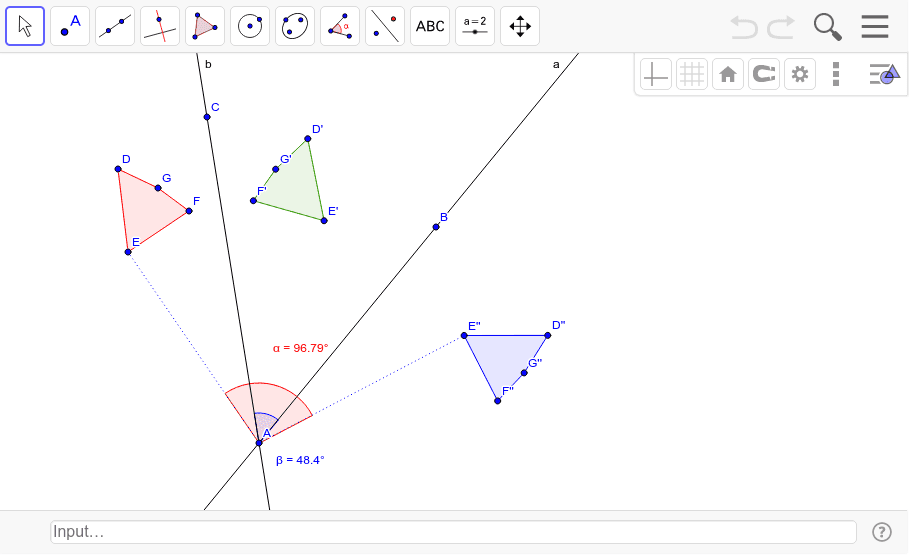
This GeoGebra example demonstrates the composition of two successive reflections of a polygon object across two intersecting lines, a and b. It visually illustrates how a geometric figure is transformed by mirror reflection and how the final double-reflected image relates to the original shape. Core mathematical concepts include plane geometric transformations, axial symmetry, composite transformations, and the rotational equivalence of two reflections across intersecting lines, with associated angles alpha and beta. The construction uses GeoGebra commands Line to define the mirror axes, Polygon to create the source object poly1, Mirror to generate the first reflected image (D', E', F', G', poly1') and the second reflected image (D'', E'', F'', G'', poly1''), Segment to draw connecting segments d, e, f, g, and Angle to mark angles alpha and beta, together with points A, B, C and auxiliary lines c, h. Suitable for middle and high school geometry instruction, GeoGebra dynamic construction tutorials, and inquiry-based learning about transformation composition.
GeoGebra Commands & Parameters
Line(A, B) → aLine(A, C) → bPolygon(D, E, F, G) → poly1, d, e, f, gMirror(D, b) → D'Mirror(E, b) → E'Mirror(F, b) → F'Mirror(G, b) → G'Polygon(D', E', F', G') → poly1', d', e', f', g'Mirror(D', a) → D''Mirror(E', a) → E''Mirror(F', a) → F''Mirror(G', a) → G''Polygon(D'', E'', F'', G'') → poly1'', d'', e'', f'', g''Segment(E, A) → cSegment(A, E'') → hAngle(E'', A, E) → αAngle(B, A, C) → β
AI Drawing Prompt Reference
Draw a quadrilateral and reflect it twice, first across line b and then across line a, to get two reflected quadrilaterals. Start by drawing two intersecting lines a and b, then draw a quadrilateral. Reflect this quadrilateral across line b to get the first reflected quadrilateral, and then reflect it across line a to get the second reflected quadrilateral. Finally, draw segments connecting a vertex of the original quadrilateral to the corresponding vertex of the second reflected quadrilateral, and mark the two reflection angles.
The prompt above was compiled from the original drawing commands and is for reference only.