
Rectified Truncated Icosahedron with 90 Vertices (GeoGebra Construction)
Loading the math board and drawing, please wait…
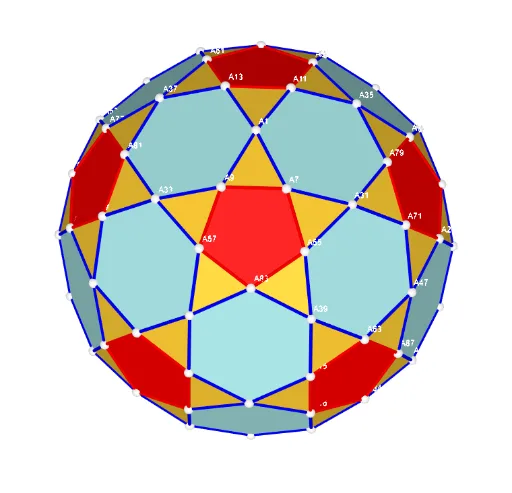
This example demonstrates how a rectified truncated icosahedron can be constructed as a 3D polyhedron with exactly 90 vertices, visualized via a structured set of spherical/space points and their connecting edges. It focuses on geometric operations on polyhedra (the rectification/truncation idea), sphere-based placement of vertices, and the use of vectors/parameterized index sets to keep the construction consistent and symmetric. Key concepts include solid geometry, polyhedral transformations, spherical geometry as a spatial constraint, and systematic indexing for vertices and segments. Construction highlights from the provided GeoGebra command summary: it uses UnicodeToLetter and Text for labeling; Sequence to generate repeating index patterns; Sum to aggregate index ranges; TableText to display tables of labels or values; Zip to pair indices with created objects; Sphere to define the carrier surface; and Points00 plus Segments (with multiple intermediate indexed objects) to generate and render the vertex set and the edge/segment network. Suitable for high-school advanced students and early undergraduate learners in solid geometry, as well as for math visualization and algorithmic geometry practice.
GeoGebra Commands & Parameters
UnicodeToLetter(34) → u34Text("" + Um1) → txt_pSum(Flatten[Sequence[Append[Sequence[Element[txt_p, i], i, m01(k), m02(k)], " "], k, 1, 5]]) → txtUm1Zip(Vector[a, a + UnitVector[a]], a, Points00) → lVector1Zip(Vector[a, a + (1.5 * UnitVector[b])], a, Points00, b, Wi_Pc) → lVector2Zip(Vector[a, a + (1.5 * UnitVector[b])], a, Points00, b, Wi_P) → lVector3Sphere((0, 0, 0), 5) → sphTableText(Append["i", 1…n], Append[" \fgcolor{orange}{GM :Δφ_i}, rad", l1w], Append["\fgcolor{magenta}{GC :Δφ_i} , rad", l1cw], "v") → text23rZip(Segment[Element[Points00, y(a)], Element[Points00, z(a)]], a, ll1bb(2)) → ll2Zip(Segment[Element[Points00, y(a)], Element[Points00, z(a)]], a, ll1bb(1)) → ll1Zip(Segment[Element[Points00, y(a)], Element[Points00, z(a)]], a, ll1bb(3)) → ll3Zip(Segment[Element[Points00, y(a)], Element[Points00, z(a)]], a, ll1bb(4)) → ll4Zip(Segment[Element[Points00, y(a)], Element[Points00, z(a)]], a, ll1bb(5)) → ll5Zip(Segment[Element[Points00, y(a)], Element[Points00, z(a)]], a, ll1bb(6)) → ll6Zip(Segment[Element[Points00, y(a)], Element[Points00, z(a)]], a, ll1bb(7)) → ll7Zip(Segment[Element[Points00, y(a)], Element[Points00, z(a)]], a, ll1bb(8)) → ll8Zip(Segment[Element[Points00, y(a)], Element[Points00, z(a)]], a, ll1bb(9)) → ll9Zip(Segment[Element[Points00, y(a)], Element[Points00, z(a)]], a, ll1bb(10)) → ll10Sequence(Polygon[Sequence[Points3D(m5(f, k)), k, 1, Length[m5(1)]]], f, 1, Length[m5]) → poly002Sequence(Polygon[Sequence[Points3D(m6(f, k)), k, 1, Length[m6(1)]]], f, 1, Length[m6]) → poly003Sequence(Polygon[Element[Points3D, Element[Element[mm1, f], 1]], Element[Points3D, Element[Element[mm1, f], 2]], Element[Points3D, Element[Element[mm1, f], 3]]], f, 1, Length[mm1]) → poly001
AI Drawing Prompt Reference
Visualize a rectified truncated icosahedron with exactly 90 vertices, constructed as a 3D polyhedron using spherical/space points and connecting edges. Start by creating a sphere to define the spatial constraint for vertex placement, then systematically position vertices using vector parameterized index sets. Connect these vertices with edges to form the polyhedron's network, emphasizing geometric operations like rectification and truncation, and systematic indexing for vertices and segments.
The prompt above was compiled from the original drawing commands and is for reference only.