
Rectangular Prisms
Loading the math board and drawing, please wait…
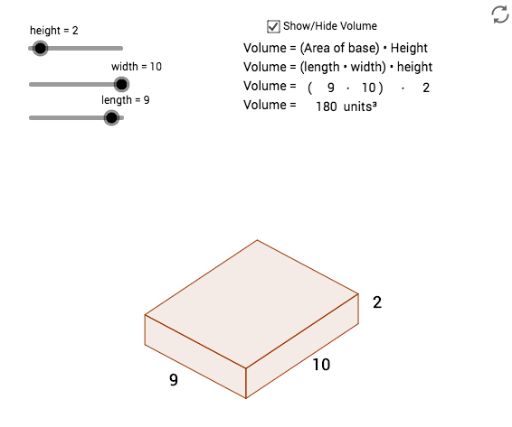
This example demonstrates the geometric construction of rectangular prisms. It involves basic geometric concepts of a rectangular prism such as length, height, and width. Using GeoGebra commands like Vector, Line, Intersect, Segment, and Polygon, it dynamically shows the faces and edges of the rectangular prism. Suitable for students in middle school and above learning solid geometry.
GeoGebra Commands & Parameters
Vector(((0.75 * width), (0.5 * width))) → wVector((0, height)) → zVector((((-0.75) * length), (0.4 * length))) → uLine(C, z) → dLine(B, w) → eLine(B, u) → fLine(A, z) → gIntersect(f, g) → DIntersect(d, e) → ESegment(A, D) → hSegment(D, B) → iSegment(B, E) → jSegment(E, C) → kLine(D, j) → lLine(E, i) → mIntersect(l, m) → FSegment(D, F) → nSegment(F, E) → pPolygon(D, A, O, B) → poly1, d_1, a_1, o, b_1Polygon(D, F, E, B) → poly2, d_2, f_1, e_1, b_2Polygon(O, C, E, B) → poly3, o_1, c_1, e_2, b_3Midpoint(o_1) → GMidpoint(c_1) → HMidpoint(a_1) → I
AI Drawing Prompt Reference
Draw a rectangular prism with length, width, and height. Start by drawing four vertices A, B, C, and D. Then use vectors to construct the other vertices E, F, G, and H. Next, draw the six faces of the prism: ABCD, BCFE, ADEF, BFGH, CDHG, and ADHE. Finally, draw the 12 edges of the prism, ensuring that each face's four edges are correctly connected.
The prompt above was compiled from the original drawing commands and is for reference only.