
Rectangular Prism: Construction and Net
Loading the math board and drawing, please wait…
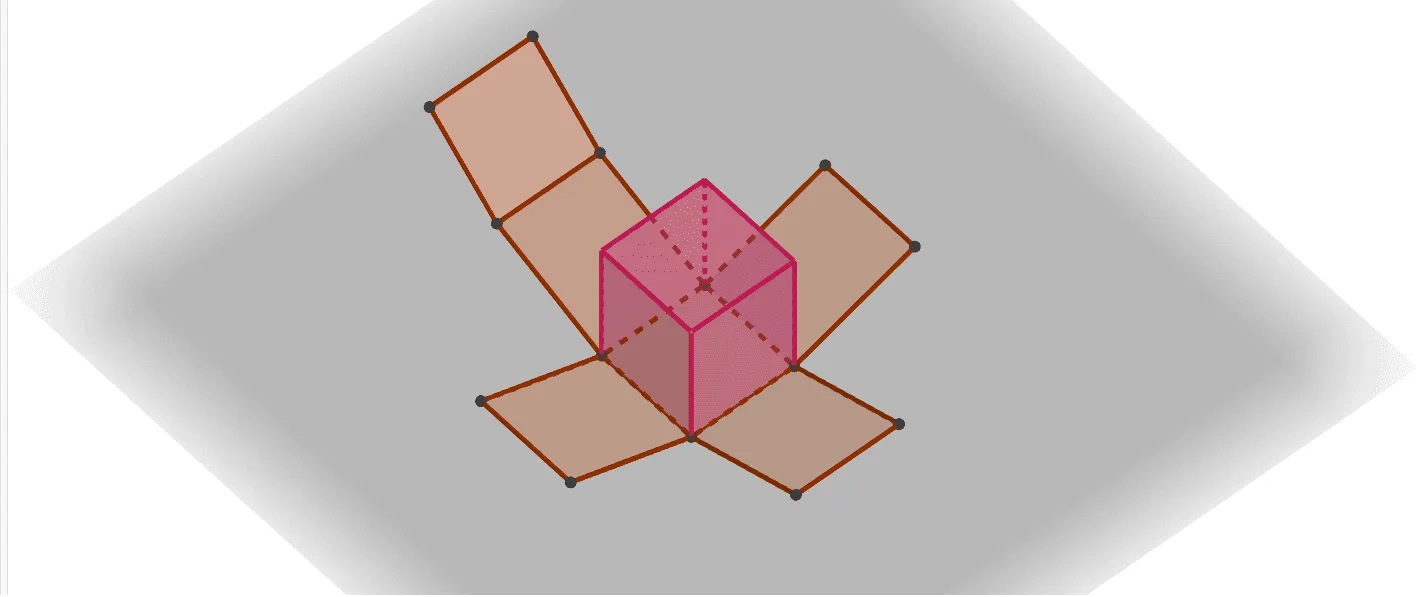
① This example demonstrates how to construct a rectangular prism (a cuboid) in GeoGebra's 3D view and display its net, allowing learners to intuitively grasp the surface structure of a solid. ② Core mathematical concepts include solid geometry fundamentals such as prism definition, faces, edges, vertices, and the correspondence between a solid and its net, along with polygons, congruence, and rational numbers. ③ Construction highlights: from the summary, the Polygon command creates the base polygon poly1, the Prism command generates the prism, and the Net command produces the unfolding; objects include vertices A, B, C, D, E, F, G, H, edges like edgeAE and edgeBF, faces such as faceABFE and faceEFGH, and auxiliary points I through S to control the unfolding animation. ④ Suitable for middle or high school students learning introductory solid geometry, and for teachers to demonstrate in class, enhancing spatial visualization and understanding of prism structure and nets.
GeoGebra Commands & Parameters
Polygon(A, B, 4, xOyPlane) → poly1, f, g, h, i, C, DPrism(Polygon[A, B, 4, xOyPlane], 5) → a, E, edgeAE, edgeBF, edge1, edge2, edgeEF, edgeFG, edgeGH, edgeEH, F, G, H, faceABFE, face2, face3, face1, faceEFGHNet(a, b) → c, I, R, S, T, U, V, faceIJKL, faceIJNM, faceJKPO, faceKLRQ, faceILST, J, faceMNUV, edgeIJ, edgeJK, edgeKL, edgeIL, edgeIM, edgeMN, edgeJN, edgeJO, edgeOP, K, edgeKP, edgeKQ, edgeQR, edgeLR, edgeLS, edgeST, edgeIT, edgeNU, edgeUV, edgeMV, L, M, N, O, P, Q
AI Drawing Prompt Reference
In 3D space, first draw a square base on the horizontal plane, then extrude it vertically to form a rectangular prism, marking all vertices and edges. Next, unfold the prism's surface into a flat net, showing the relative positions and connections of its six faces, while keeping auxiliary points to illustrate the folding animation. The figure should clearly show the correspondence between the base, side faces, and top, as well as the shape and size consistency of each face after unfolding.
The prompt above was compiled from the original drawing commands and is for reference only.