
Rectangular Prism Construction and Calculus Demo
Loading the math board and drawing, please wait…
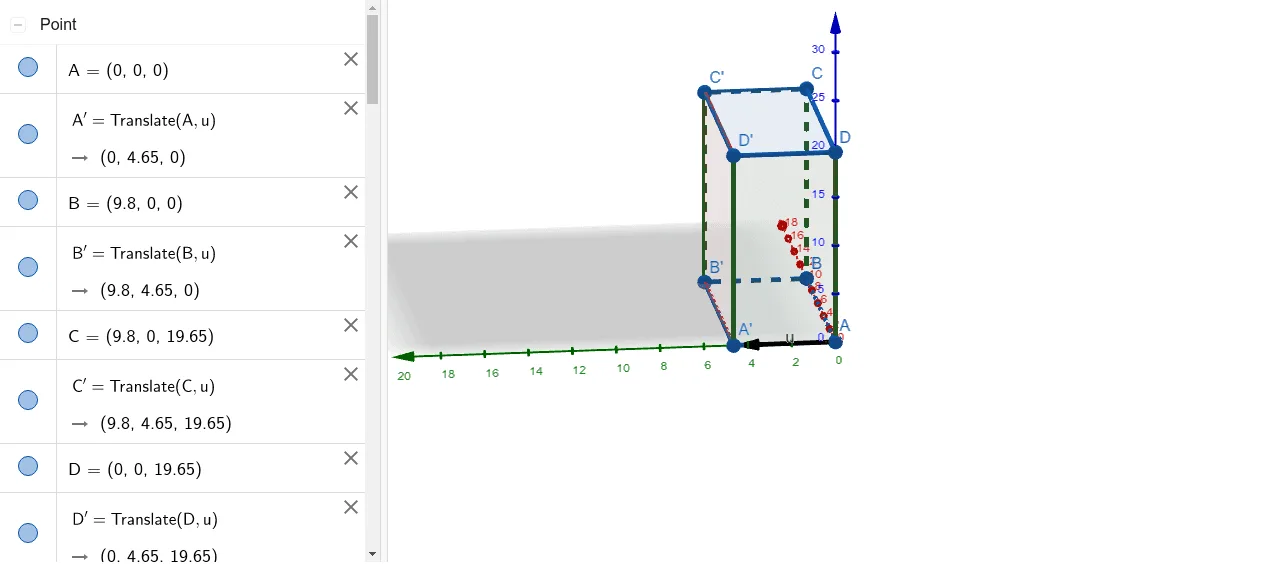
This example demonstrates how to construct a rectangular prism using GeoGebra and illustrates its relationship with integral calculus and differential calculus. Core math concepts include solid geometry, vector operations, integral calculations, and derivative applications. The construction uses commands like Polygon, Vector, and Translate to build the prism and related elements. Suitable for high school and above students learning solid geometry, calculus, and geometric constructions.
GeoGebra Commands & Parameters
Polygon(A, B, C, D) → q1, a, b, c, dVector((0, 4.65, 0)) → uTranslate(A, u) → A'Translate(D, u) → D'Translate(C, u) → C'Translate(B, u) → B'Polygon(A', B', C', D') → q2, a', b', c', d'Polygon(D, D', A', A) → q3, d_1, f, g, a_1Polygon(C, C', B', B) → q4, c_1, h, i, b_1Polygon(D, D', C', C) → q5, d_2, j, k, c_2Polygon(A, B, B', A') → q6, a_2, b_2, l, m
AI Drawing Prompt Reference
Construct a three-dimensional rectangular prism. Start with a base quadrilateral, then translate it vertically upward to create the top face. Connect corresponding vertices to form four side faces. The prism consists of six polygonal faces: two congruent quadrilaterals (base and top) and four rectangular side faces. All edges are visible, and the shape is symmetric with right angles at each vertex.
The prompt above was compiled from the original drawing commands and is for reference only.