
Rectangle Formation in a Parallelogram
Loading the math board and drawing, please wait…
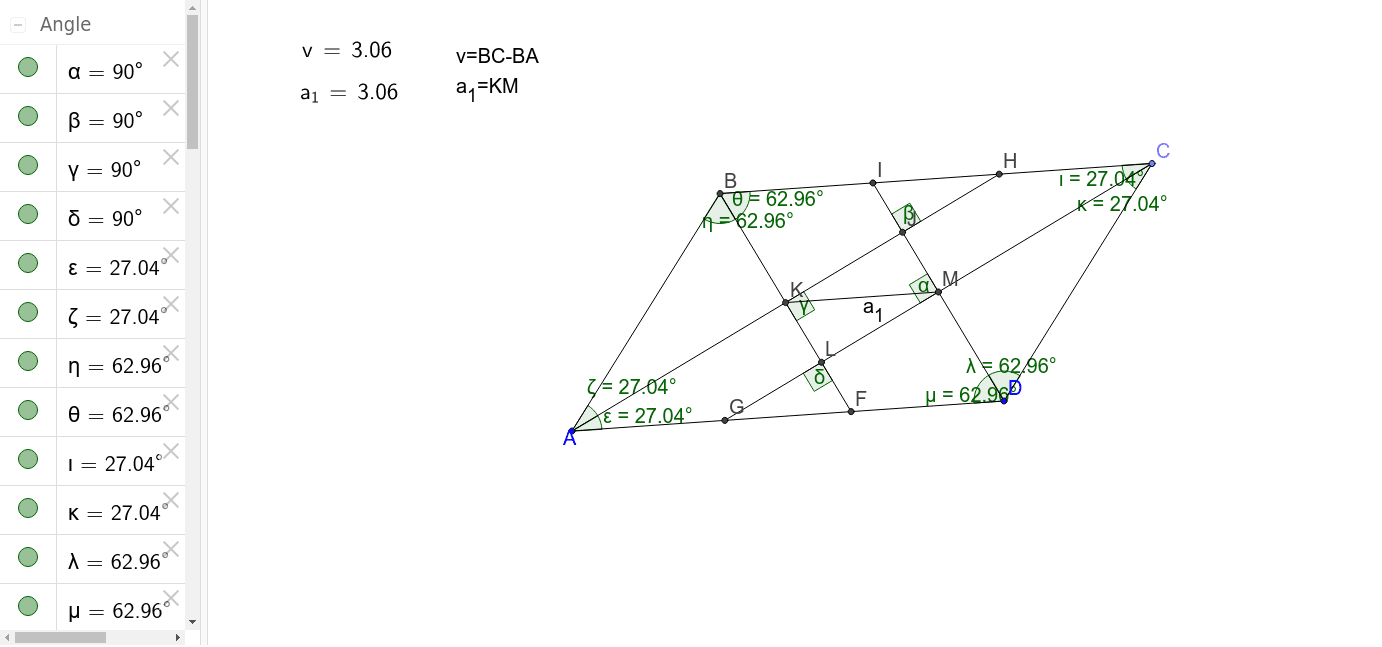
This example demonstrates the formation of a rectangle as a result of cross-cutting by angle bisectors within a parallelogram. Key math concepts include parallelogram properties, angle bisector theorem, rectangle criteria, and analytical geometry construction. GeoGebra commands and objects used in the construction are Line, Point, Segment, Intersect, AngularBisector, Angle, and Length. Suitable for high school geometry instruction and exploratory learning.
GeoGebra Commands & Parameters
Line(A, D) → aLine(C_1, a) → bPoint(b) → CSegment(D, C) → cLine(A, c) → dIntersect(b, d) → BSegment(C, B) → eSegment(B, A) → fSegment(A, D) → gAngularBisector(e, c) → h, iAngularBisector(e, f) → j, kAngularBisector(f, g) → l, mAngularBisector(g, c) → n, pIntersect(k, g) → FIntersect(i, g) → GIntersect(m, e) → HIntersect(p, e) → ISegment(D, I) → qSegment(A, H) → rSegment(B, F) → sSegment(C, G) → tIntersect(r, q) → JIntersect(r, s) → KIntersect(s, t) → LIntersect(q, t) → MAngle(q, t) → αAngle(r, q) → βAngle(s, r) → γAngle(t, s) → δSegment(K, M) → a_1Angle(D, A, H) → εAngle(H, A, B) → ζAngle(A, B, F) → ηAngle(F, B, C) → θAngle(B, C, G) → ιAngle(G, C, D) → κAngle(C, D, I) → λAngle(I, D, A) → μLaTeX(a_1, true, true) → text1Length(e) → oLength(f) → uLaTeX(v, true, true) → text2
AI Drawing Prompt Reference
Within a parallelogram, demonstrate how a rectangle forms by drawing angle bisectors. Start by sketching the sides and diagonals of the parallelogram, then find the intersections of the angle bisectors and connect these points to form a rectangle. Measure and label the relevant angles and side lengths, highlighting the geometric properties of the rectangle formed by the intersections of the angle bisectors inside the parallelogram.
The prompt above was compiled from the original drawing commands and is for reference only.