
Rectangle and Triangle Area Relationship by Declanmcmanamon123
Loading the math board and drawing, please wait…
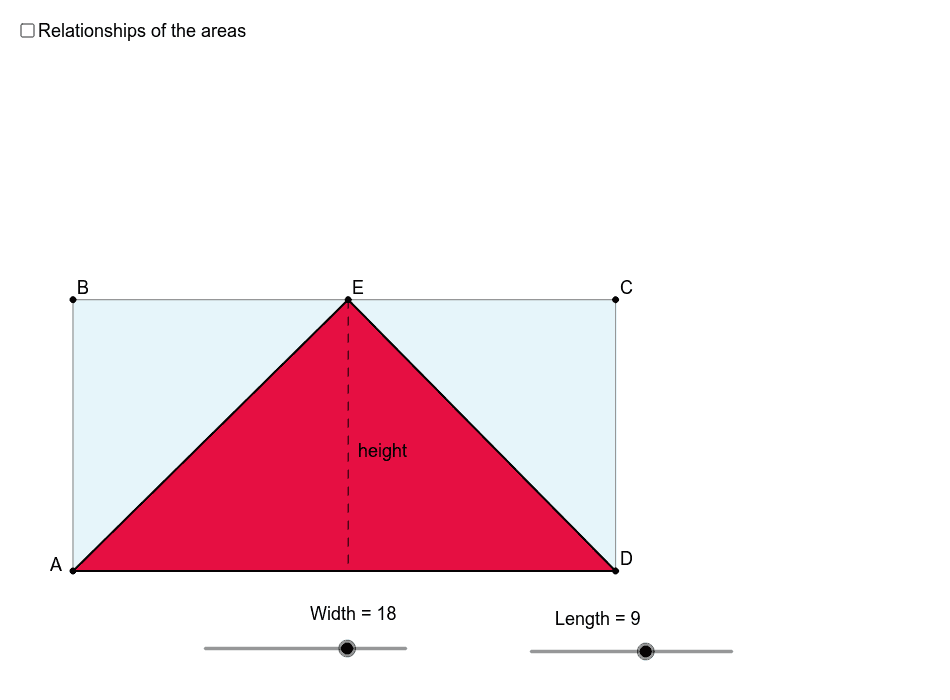
①This example dynamically demonstrates the area relationship between a triangle inscribed in a rectangle and the rectangle itself, showing that the triangle's area is always half of the rectangle's area. ②Core mathematical concepts include area formulas, the inclusion relationship between triangles and rectangles, geometric transformations such as dilation, and area conservation. ③Construction details: Using GeoGebra commands like Point, Segment, OrthogonalLine, Intersect, and Polygon to build the rectangle and triangle, with Length and Width objects defining dimensions, and Text objects displaying area values; possibly involving sliders or dilation for dynamic adjustment. ④Suitable for middle school geometry lessons or upper elementary area concepts, and useful for teachers demonstrating area formula derivation and visual reasoning about geometric relationships.
GeoGebra Commands & Parameters
Point(Circle[A, Length]) → BSegment(A, B) → aPoint(Circle[A, Width]) → DSegment(A, D) → bOrthogonalLine(D, b) → cOrthogonalLine(B, a) → dIntersect(c, d) → CSegment(B, C) → eSegment(C, D) → fPoint(e) → EPolygon(E, A, D) → poly1, d_1, e_1, a_1Polygon(A, B, C, D) → poly2, a_2, b_1, c_1, d_2OrthogonalLine(E, b) → gIntersect(g, b) → FSegment(E, F) → height
AI Drawing Prompt Reference
Draw a rectangle with an inscribed triangle to demonstrate that the triangle's area is always half of the rectangle's area. The rectangle is formed by connecting the endpoints of two parallel line segments, and the triangle is formed by connecting one side of the rectangle to the intersection of the diagonals. Use dynamic sliders or transformations to show the area relationship and label the areas of the rectangle and triangle.
The prompt above was compiled from the original drawing commands and is for reference only.