
Recognize the Shapes of These Objects
Loading the math board and drawing, please wait…
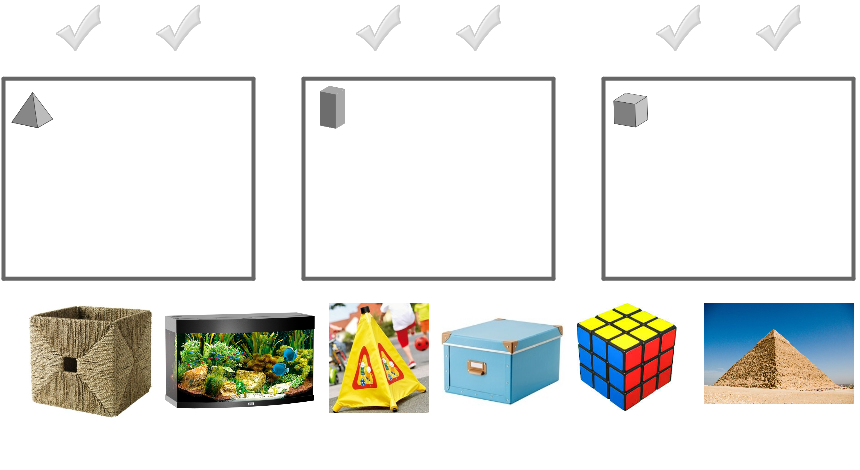
Sort objects into grey boxes based on their shapes. This example involves cube, prism, and pyramid in solid geometry. It uses commands like Polygon, Corner, and Midpoint in GeoGebra. Suitable for middle school and above students to learn solid geometry.
GeoGebra Commands & Parameters
Polygon(O_1, P_1, Q_1, R_1) → Vieleck1, o_1, p_1, q_1, r_1Polygon(S_1, T_1, U_1, V_1) → Vieleck2, s_1, t_1, u_1, v_1Polygon(W_1, Z_1, A_2, B_2) → Vieleck3, w_1, z_1, a_2, b_2Corner(pyramideYellow, 3) → ACorner(pyramide, 3) → BCorner(prismBox, 3) → CCorner(prismFish, 3) → DCorner(cubeBox, 3) → ECorner(cubeRubiks, 3) → FMidpoint(U_2, A) → GMidpoint(W_2, B) → HMidpoint(A_3, C) → IMidpoint(E_3, D) → JMidpoint(C_3, E) → KMidpoint(G_3, F) → L
AI Drawing Prompt Reference
Draw a cube and a Rubik's cube, then draw a prism and a pyramid. The cube and Rubik's cube each have three corner points, and the prism and pyramid also have three corner points. The three corner points of the cube are E, F, and G; the three corner points of the prism are C, D, and E; the three corner points of the pyramid are A, B, and C.
The prompt above was compiled from the original drawing commands and is for reference only.