
Ratio of Perimeters and Area
Loading the math board and drawing, please wait…
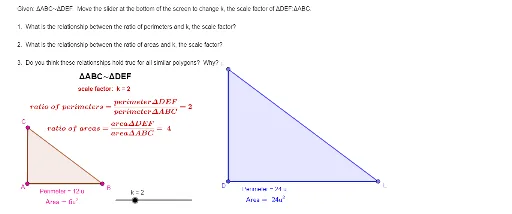
This example demonstrates the calculation and visualization of the ratio of perimeters to areas for different geometric shapes like circles and rhombuses. It involves core math concepts including perimeter, area, definite integrals, real numbers, and geometric properties. Construction highlights include commands for points, segments, polygons, slider animations, function graphing, and integral calculations. Suitable for high school and above learners to understand quantitative relationships in geometry and applications of calculus.
GeoGebra Commands & Parameters
Point(Circle[A, 4]) → BSegment(A, B) → fPoint(Circle[A, 3]) → CSegment(A, C) → gPolygon(A, B, C) → t1, c, a, bPoint(Circle[D, (4 * k)]) → ESegment(D, E) → hPoint(Circle[D, (3 * k)]) → FSegment(D, F) → iPolygon(D, F, E) → t2, e, d, f_1
AI Drawing Prompt Reference
Draw two similar triangles: one formed by a center point and two points on concentric circles with radii 4 and 3, connected by segments; the other formed by a different center point and points on concentric circles with radii scaled by a parameter (4k and 3k), connected similarly. The triangles are homothetic, with corresponding sides parallel. Include a slider to adjust the scale factor, and display the ratio of perimeters and areas between the two triangles, using shaded regions or integral areas to visualize the proportional relationship.
The prompt above was compiled from the original drawing commands and is for reference only.