
GeoGebra 9.1 Translation
Loading the math board and drawing, please wait…
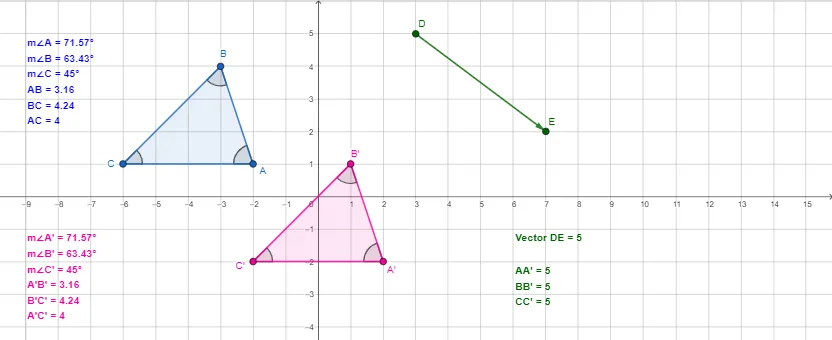
This example demonstrates the concept of translation, involving the symmetry of an equilateral triangle. Using GeoGebra commands such as Polygon, Vector, Translate, and Distance, an equilateral triangle can be constructed and translated. Suitable for middle school and above students to learn geometric transformations and symmetry.
GeoGebra Commands & Parameters
Polygon(A, B, C) → t1, c, a, bVector(D, E) → uAngle(B, A, C) → αAngle(A, B, C) → βAngle(B, C, A) → γTranslate(A, u) → A'Translate(B, u) → B'Translate(C, u) → C'Polygon(A', B', C') → t1', c', a', b'Angle(B', A', C') → δAngle(A', B', C') → εAngle(B', C', A') → ζDistance(B, B') → distanceBB'Distance(A, A') → distanceAA'Distance(C, C') → distanceCC'
AI Drawing Prompt Reference
Draw an equilateral triangle and label its three interior angles. Create a vector starting from a point outside the triangle. Translate all three vertices of the triangle by this vector to form a second equilateral triangle. Connect each original vertex to its corresponding translated vertex with line segments, and display the lengths of these three segments. Label the three interior angles of the translated triangle as well. The figure illustrates the translation of an equilateral triangle along a vector, showing the congruence between the original and translated shapes.
The prompt above was compiled from the original drawing commands and is for reference only.