
GeoGebra 9.5 Dilations
Loading the math board and drawing, please wait…
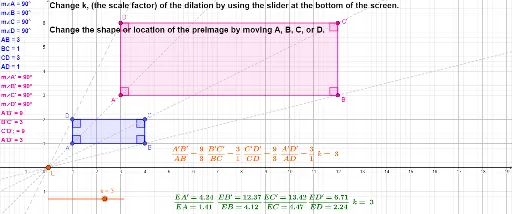
This example demonstrates geometric dilations using GeoGebra, focusing on equilateral triangles, circumcircles, combinatorics, and logical optimization. Key math concepts include dilation transformations, properties of equilateral triangles, circumcircle relationships, angle calculations, and optimization problems. Constructed with commands like Polygon, Intersect, Angle, Dilate, Line, Distance, and Midpoint, it offers precise geometric constructions and dynamic demonstrations, suitable for high school mathematics education and geometric construction learning.
GeoGebra Commands & Parameters
Polygon(A, B, C, D) → q1, a, b, c, dIntersect(xAxis, yAxis) → EAngle(B, A, D) → αAngle(A, B, C) → βAngle(B, C, D) → γAngle(C, D, A) → δDilate(A, k, E) → A'Dilate(B, k, E) → B'Dilate(C, k, E) → C'Dilate(D, k, E) → D'Polygon(A', B', C', D') → q1', a', b', c', d'Angle(B', A', D') → εAngle(A', B', C') → ζAngle(B', C', D') → ηAngle(A', D', C') → θLine(D, D') → fLine(A, A') → gLine(C, C') → hLine(B, B') → iDistance(E, D) → distanceEDDistance(E, D') → distanceED'Distance(E, A) → distanceEADistance(E, A') → distanceEA'Distance(E, C) → distanceECDistance(E, C') → distanceEC'Distance(E, B) → distanceEBDistance(E, B') → distanceEB'Distance(E, B') → eMidpoint(E, B') →
AI Drawing Prompt Reference
Draw an equilateral triangle and find the intersection points of its vertices with the coordinate axes. Perform a dilation transformation centered at the origin to obtain a new equilateral triangle. Connect the corresponding vertices of the original and dilated triangles, and calculate the distances from each vertex to the center. Display the original and dilated triangles, along with the three lines connecting corresponding vertices.
The prompt above was compiled from the original drawing commands and is for reference only.