
Rainbow Reflection on a Circle: Mirror Images as a Parameterized Sequence
Loading the math board and drawing, please wait…
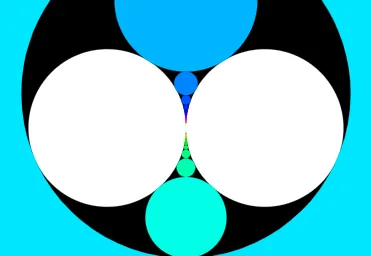
This example demonstrates a “rainbow” pattern of reflected lines on a circle: as the driving point/direction varies with a parameter, consecutive mirror reflections are constructed, producing an ordered band-like visual trace. Key math ideas include circle geometry (often in the unit-circle setting), reflection (mirror transformation), and parameterization/iteration that turns a single reflection rule into a reflected sequence. Construction is built with GeoGebra commands from the summary: Circle to create the circle; Mirror to compute reflected rays or segments with respect to a chosen geometric element; Length to measure the relevant segments; and Element-style object management (e.g., hue, button1, O, t, g, C0/C1/C2, L_1, f, n, and many points A1, A2, …) to plot multiple reflection outputs in succession. Suitable for middle/high school geometry, interactive classroom demonstrations, and exploratory learning focused on reflection properties and parameter-driven geometric construction.
GeoGebra Commands & Parameters
Circle(O, 1) → C0Circle(O - (0.5, 0), 0.5) → C1Circle(O + (0.5, 0), 0.5) → C2Mirror(Sequence[Circle[(0, t + k), 1], k, -30, 30, 2], C0) → L_1Length(L_1) → nElement(L_1, 1) → A1Element(L_1, 2) → A2Element(L_1, 3) → A3Element(L_1, 4) → A4Element(L_1, 5) → A5Element(L_1, 6) → A6Element(L_1, 7) → A7Element(L_1, 8) → A8Element(L_1, 9) → A9Element(L_1, 10) → A10Element(L_1, 11) → A11Element(L_1, 12) → A12Element(L_1, 13) → A13Element(L_1, 14) → A14Element(L_1, 15) → A15Element(L_1, 16) → A16Element(L_1, 17) → A17Element(L_1, 18) → A18Element(L_1, 19) → A19Element(L_1, 20) → A20Element(L_1, 21) → A21Element(L_1, 22) → A22Element(L_1, 23) → A23Element(L_1, 24) → A24Element(L_1, 25) → A25Element(L_1, 26) → A26Element(L_1, 27) → A27Element(L_1, 28) → A28Element(L_1, 29) → A29Element(L_1, 30) → A30Element(L_1, 31) → A31
AI Drawing Prompt Reference
Draw a circle and two concentric circles with radii half of the original circle. Generate a series of rays parametrically and reflect them multiple times over the first circle to create a rainbow-like pattern. Extract points along these reflected rays sequentially and draw them in different colors to visualize the continuous effect of successive mirror reflections.
The prompt above was compiled from the original drawing commands and is for reference only.