
Radians Game
Loading the math board and drawing, please wait…
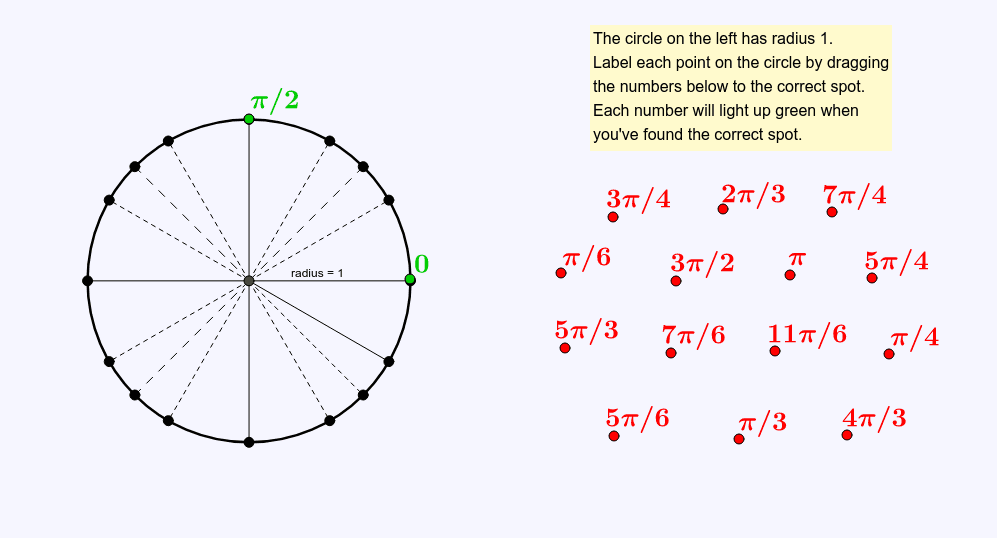
This example demonstrates how to label points on a circle by dragging numbers to their correct positions, illustrating the concept of radians. Core math concepts include radian measure, circular angles, and geometric construction. It uses GeoGebra commands like Intersect, Point, Circle, Segment, Length, and Midpoint. Suitable for middle school and above students learning about radians or geometric constructions.
GeoGebra Commands & Parameters
Intersect(xAxis, yAxis) → APoint(h) → BCircle(A, B) → circSegment(A, B) → arm0Length(arm0) → rMidpoint(arm0) → ESegment(A, C) → fSegment(A, D) → gSegment(A, F) → iSegment(A, G) → jSegment(A, H) → kSegment(A, I) → lSegment(A, J) → mSegment(A, K) → nSegment(A, L) → pSegment(A, M) → qSegment(A, N) → sSegment(A, O) → tSegment(A, P) → aSegment(A, Q) → bSegment(A, R) → cSegment(B, S) → dSegment(C, T) → eSegment(D, U) → f_1Segment(F, V) → g_1Segment(G, W) → h_1Segment(H, Z) → i_1Segment(I, A_1) → j_1Segment(J, B_1) → k_1Segment(K, C_1) → l_1Segment(L, D_1) → m_1Segment(M, E_1) → n_1Segment(N, F_1) → p_1Segment(O, G_1) → q_1Segment(P, H_1) → r_1Segment(Q, I_1) → s_1Segment(R, J_1) → t_1