
r=0: Limit Construction from Circle to Point and Geometric Exploration
Loading the math board and drawing, please wait…
In collections
ATC Cobwebs and Linear Difference Equations
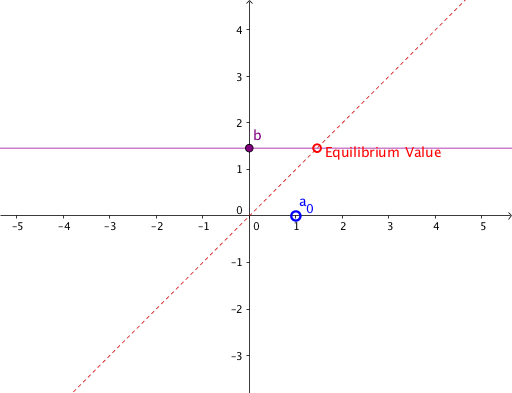
This example demonstrates a geometric construction with radius r=0, where dynamic adjustment of the radius parameter causes circles, triangles, and cones to degenerate into points or lines. Core mathematical concepts include the equation of a circle, triangle sides and intersections, and the connection to indefinite integrals and cone volume. The construction uses GeoGebra commands such as Point, Segment, and Intersect to create points, segments, and intersection points, with multiple auxiliary objects (A1 to A22, B1, C1, etc.) tracking geometric relations as the radius changes. Suitable for high school or early college students to understand limit concepts, geometric degeneration, and parametric construction in dynamic geometry software.
GeoGebra Commands & Parameters
Point(yAxis) → CPoint(xAxis) → ASegment(A, (x(A), f(x(A)))) → cSegment((A1, A2), (A2, A2)) → B1Segment((A2, A2), (A2, A3)) → C1Segment((A2, A3), (A3, A3)) → B2Segment((A3, A3), (A3, A4)) → C2Segment((A3, A4), (A4, A4)) → B3Segment((A4, A4), (A4, A5)) → C3Segment((A4, A5), (A5, A5)) → B4Segment((A5, A5), (A5, A6)) → C4Segment((A5, A6), (A6, A6)) → B5Segment((A6, A6), (A6, A7)) → C5Segment((A6, A7), (A7, A7)) → B6Segment((A7, A7), (A7, A8)) → C6Segment((A7, A8), (A8, A8)) → B7Segment((A8, A8), (A8, A9)) → C7Segment((A8, A9), (A9, A9)) → B8Segment((A9, A9), (A9, A10)) → C8Segment((A9, A10), (A10, A10)) → B9Segment((A10, A10), (A10, A11)) → C9Segment((A10, A11), (A11, A11)) → B10Segment((A11, A11), (A11, A12)) → C10Segment((A11, A12), (A12, A12)) → B11Segment((A12, A12), (A12, A13)) → C11Segment((A12, A13), (A13, A13)) → B12Segment((A13, A13), (A13, A14)) → C12Segment((A13, A14), (A14, A14)) → B13Segment((A14, A14), (A14, A15)) → C13Segment((A14, A15), (A15, A15)) → B14Segment((A15, A15), (A15, A16)) → C14Segment((A15, A16), (A16, A16)) → B15Segment((A16, A16), (A16, A17)) → C15Segment((A16, A17), (A17, A17)) → B16Segment((A17, A17), (A17, A18)) → C16Segment((A17, A18), (A18, A18)) → B17Segment((A18, A18), (A18, A19)) → C17Segment((A18, A19), (A19, A19)) → B18Segment((A19, A19), (A19, A20)) → C18Segment((A19, A20), (A20, A20)) → B19Segment((A20, A20), (A20, A21)) → C19Segment((A20, A21), (A21, A21)) → B20Segment((A21, A21), (A21, A22)) → C20Segment((A21, A22), (A22, A22)) → B21Segment((A22, A22), (A22, A23)) → C21Segment((A22, A23), (A23, A23)) → B22Segment((A23, A23), (A23, A24)) → C22Segment((A23, A24), (A24, A24)) → B23Segment((A24, A24), (A24, A25)) → C23Segment((A24, A25), (A25, A25)) → B24Segment((A25, A25), (A25, A26)) → C24Segment((A25, A26), (A26, A26)) → B25Segment((A26, A26), (A26, A27)) → C25Segment((A26, A27), (A27, A27)) → B26Segment((A27, A27), (A27, A28)) → C26Segment((A27, A28), (A28, A28)) → B27Segment((A28, A28), (A28, A29)) → C27Segment((A28, A29), (A29, A29)) → B28Segment((A29, A29), (A29, A30)) → C28Segment((A29, A30), (A30, A30)) → B29Segment((A30, A30), (A30, A31)) → C29Segment((A30, A31), (A31, A31)) → B30Segment((A31, A31), (A31, A32)) → C30Segment((A31, A32), (A32, A32)) → B31Segment((A32, A32), (A32, A33)) → C31Segment((A32, A33), (A33, A33)) → B32Segment((A33, A33), (A33, A34)) → C32Segment((A33, A34), (A34, A34)) → B33Segment((A34, A34), (A34, A35)) → C33Segment((A34, A35), (A35, A35)) → B34Segment((A35, A35), (A35, A36)) → C34Segment((A35, A36), (A36, A36)) → B35Segment((A36, A36), (A36, A37)) → C35Segment((A36, A37), (A37, A37)) → B36Segment((A37, A37), (A37, A38)) → C36Segment((A37, A38), (A38, A38)) → B37Segment((A38, A38), (A38, A39)) → C37Segment((A38, A39), (A39, A39)) → B38Segment((A39, A39), (A39, A40)) → C38Intersect(f, b) → B
AI Drawing Prompt Reference
Draw a circle with its center on the y-axis and a point on the x-axis lying on the circle. Then mark a sequence of points along the circle and connect them with straight segments to form a polygonal path that spirals inward toward the center. Also construct a right triangle using the center and the x-axis point, and draw its hypotenuse. Use a slider to control the radius; as the radius shrinks to zero, the circle, triangle, and polygonal path degenerate into points or lines, illustrating the limiting behavior of the geometric shapes.
The prompt above was compiled from the original drawing commands and is for reference only.