
Quiz on Meaning of Solving Equations: Interactive GeoGebra Exercise
Loading the math board and drawing, please wait…
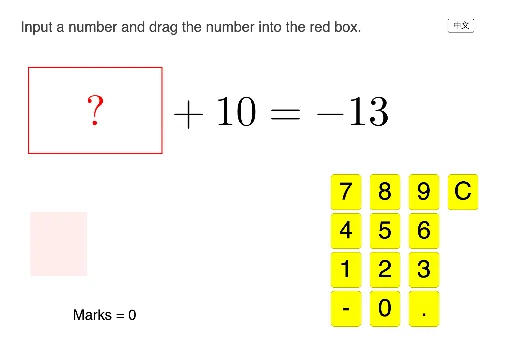
① This example demonstrates an interactive quiz on the meaning of solving equations, where random parameters generate varied problems, conditional logic checks answers, and geometric constructions (polygons, region tests) illustrate algebraic solutions visually. ② Core mathematical concepts covered include solving linear and nonlinear equations, properties of power functions, introductory differential calculus, geometry of isosceles triangles, binomial probability distributions, and cosine function applications. ③ Construction highlights: Random for parameter generation, If for branching logic, Polygon for drawing shapes such as triangles, IsInRegion for detecting whether user inputs or dragged points lie inside target regions; objects include text input fields, question type flags, blank placeholders, multiple buttons (next, check, numeric keypad), and variables a, b, f, g, h, i, A, P, etc. ④ Suitable for high‑school mathematics (core and elective courses) and college‑preparatory levels, useful for classroom interaction, self‑study, or online assessment.
GeoGebra Commands & Parameters
Random(1, 4) → qtypeRandom(-20, 20) → aRandom(-20, 20) → bIf(qtype ≟ 1, textQ1, qtype ≟ 2, textQ2, qtype ≟ 3, textQ3, qtype ≟ 4, textQ4) → textQPolygon(Corner[textQ, 1], Corner[textQ, 2], Corner[textQ, 3], Corner[textQ, 4]) → q1, f, g, h, iIsInRegion(A, q1) → inBoxIf(qtype ≟ 1, b - a, qtype ≟ 2, b + a, qtype ≟ 3, b - a, qtype ≟ 4, a - b) → ans
AI Drawing Prompt Reference
Create an interactive math exercise demonstrating the meaning of solving equations. Generate random parameters, display different texts based on problem types, draw polygons for geometric shapes, and use region tests to determine if user input points lie within target areas. Include multiple buttons and text input fields, along with variables like a and b, to illustrate applications of linear and nonlinear equations, power functions, differential calculus, isosceles triangles, binomial probability distributions, and cosine functions.
The prompt above was compiled from the original drawing commands and is for reference only.