
Quadrilaterals and Rotational Symmetry
Loading the math board and drawing, please wait…
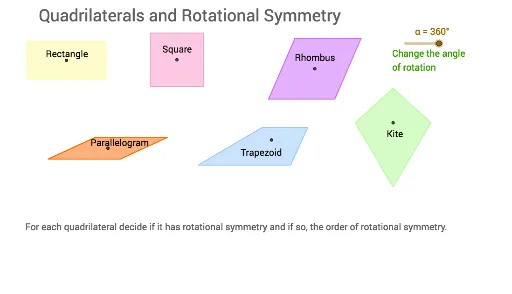
This example demonstrates the rotational symmetry of quadrilaterals. Key mathematical concepts include the properties of quadrilaterals and rotational symmetry. Using GeoGebra commands such as Segment, OrthogonalLine, Point, Intersect, Polygon, Circle, Line, Rotate, Mirror, etc., a quadrilateral with rotational symmetry can be constructed. Suitable for middle school and above students to learn geometric transformations.
GeoGebra Commands & Parameters
Segment(A, B) → aOrthogonalLine(A, a) → bOrthogonalLine(B, a) → cPoint(b) → COrthogonalLine(C, b) → dIntersect(c, d) → DPolygon(C, D, B, A) → poly1, c_1, d_1, b_1, a_1Segment(C, B) → eSegment(D, A) → fIntersect(e, f) → EPolygon(F, G, 4) → poly2, f_1, g, h, i, H, ISegment(I, G) → jSegment(H, F) → kIntersect(j, k) → JSegment(K, L) → lCircle(K, L) → pPoint(p) → MSegment(K, M) → mLine(M, l) → nLine(L, m) → qIntersect(n, q) → NSegment(M, L) → rSegment(N, K) → sIntersect(r, s) → OPolygon(M, N, L, K) → poly3, m_1, n_1, l_1, k_1Rotate(C, (-α), E) → C'Rotate(D, (-α), E) → D'Rotate(B, (-α), E) → B'Rotate(A, (-α), E) → A'Polygon(C', D', B', A') → poly1', c', d', b', a'Rotate(M, (-α), O) → M'Rotate(N, (-α), O) → N'Rotate(L, (-α), O) → L'Rotate(K, (-α), O) → K'Polygon(M', N', L', K') → poly3', m', n', l', k'Segment(P, Q) → tSegment(P, R) → e_1Line(Q, e_1) → g_1Line(R, t) → h_1Intersect(g_1, h_1) → SPolygon(P, R, S, Q) → poly4, p_1, r_1, s_1, q_1Segment(R, Q) → i_1Segment(S, P) → j_1Intersect(i_1, j_1) → TRotate(P, (-α), T) → P'Rotate(R, (-α), T) → R'Rotate(S, (-α), T) → S'Rotate(Q, (-α), T) → Q'Polygon(P', R', S', Q') → poly4', p', r', s', q'Segment(U, V) → t_1Segment(U, W) → a_2Line(W, t_1) → b_2Point(b_2) → ZSegment(Z, V) → c_2Polygon(U, V, Z, W) → poly5, u, v, z, wSegment(W, V) → d_2Segment(Z, U) → e_2Intersect(d_2, e_2) → A_1Rotate(U, (-α), A_1) → U'Rotate(V, (-α), A_1) → V'Rotate(Z, (-α), A_1) → Z'Rotate(W, (-α), A_1) → W'Polygon(U', V', Z', W') → poly5', u', v', z', w'Line(B_1, C_1) → f_2Mirror(D_1, f_2) → E_1Polygon(D_1, B_1, E_1, C_1) → poly6, d_3, b_3, e_3, c_3Segment(D_1, E_1) → g_2Intersect(f_2, g_2) → F_1Rotate(D_1, (-α), F_1) → G_1Rotate(B_1, (-α), F_1) → H_1Rotate(E_1, (-α), F_1) → I_1Rotate(C_1, (-α), F_1) → J_1Polygon(G_1, H_1, I_1, J_1) → poly6', g_3, h_2, i_2, j_2Rotate(poly2, (-α), J) → poly2'Rotate(C', (-(45°)), E) → C''Rotate(D', (-(45°)), E) → D''Rotate(B', (-(45°)), E) → B''Rotate(A', (-(45°)), E) → A''
AI Drawing Prompt Reference
Draw a quadrilateral and demonstrate its rotational symmetry. First, construct the quadrilateral, then find the midpoints of opposite sides and connect them to form a new quadrilateral. Next, draw a circle centered at one vertex of the quadrilateral and locate the symmetric points on the circle. Finally, rotate the quadrilateral around one vertex and draw the rotated shape to show the rotational symmetry.
The prompt above was compiled from the original drawing commands and is for reference only.