
Quadrilateral Names and Interior/Exterior Angle Sum
Loading the math board and drawing, please wait…
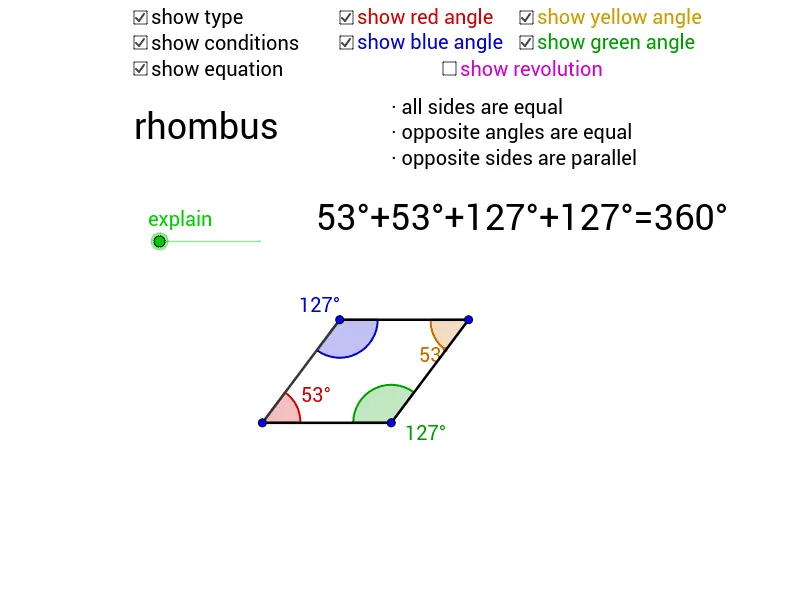
This GeoGebra example demonstrates how to name and classify quadrilaterals—such as parallelograms, rectangles, rhombi, squares, and trapeziums—based on their defining conditions. It provides a dynamic proof that the sum of interior angles of any quadrilateral is 360°, and explores the corresponding exterior angle sum property. Core mathematical concepts include polygon classification, interior and exterior angle theorems, angle measurement, and rotational relationships. The construction uses GeoGebra commands Vector, If, Rotate, Line, Angle, Polygon, OrthogonalLine, and Intersect, with objects including points A–D, lines, angles, and polygon poly1 to build perpendiculars, intersections, and angle markers. Suitable for middle school geometry instruction, self-paced inquiry, quadrilateral review, and geometric construction practice.
GeoGebra Commands & Parameters
Vector(B, A) → wIf((4 ≤ n) ∧ (n ≤ 5), n - 4, 1) → WIf((2 ≤ n) ∧ (n ≤ 3), n - 2, 1) → SIf((1 ≤ n) ∧ (n ≤ 2), n - 1, 1) → QIf((0 ≤ n) ∧ (n < 1), n, 1) → PIf(P < 1, 0, Q) → RIf(R < 1, 0, S) → TIf((3 ≤ n) ∧ (n ≤ 4), n - 3, 1) → UIf(T < 1, 0, U) → VIf(V < 1, 0, W) → ZRotate(D, (V * 180)°, B) → KVector(D, A) → uLine(A, B) → aLine(C, D) → bLine(A, C) → cLine(B, D) → dAngle(C, A, B) → αLine(D, A) → fLine(E, d) → gLine(E, b) → hAngle(F, E, G) → βVector(C, A) → vRotate(A, (P * 180)°, C) → JRotate(D, (P * 180)°, C) → IRotate(A, (V * 180)°, B) → HAngle(J, L, M) → γAngle(H, O, N) → δPolygon(A, C, D, B) → poly1, a_1, c_1, d_1, b_1OrthogonalLine(C, c_1) → eIntersect(e, a) → E_1OrthogonalLine(E_1, e) → iOrthogonalLine(B, d) → jIntersect(j, c) → F_1OrthogonalLine(F_1, j) → kAngle(C, A, B) → ε
AI Drawing Prompt Reference
Draw a quadrilateral ABCD and connect its diagonals AC and BD, marking the interior angles α, β, γ, δ, and ε, as well as the sides AB, BC, CD, and DA. Start by drawing points A, B, C, and D, then connect them to form the quadrilateral. Next, draw the diagonals AC and BD, and finally measure and mark each interior angle.
The prompt above was compiled from the original drawing commands and is for reference only.