
Q1 Math Example
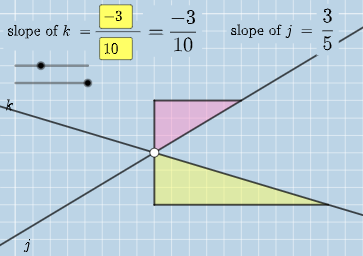
Loading the math board and drawing, please wait…
In collections
Exploring Parallel Lines in the Coordinate Plane
This example demonstrates interactive geometric constructions and phenomena using GeoGebra; involves core math concepts like algebra, angles, difference and slope, geometry, straight lines, ratios, volume, cuboid, cone, optimization problems; constructed using commands like Intersect, Angle, Textfield, Polygon, Segment, FractionText; suitable for high school and above learners to understand geometric constructions and optimization problem solving.
GeoGebra Commands & Parameters
Intersect(k, j) → CAngle(A, C, B) → αIntersect(k, eq3) → DAngle(A, D, B) → βIntersect(j, eq4) → EAngle(A, E, B) → γTextfield(a) → InputBox1Textfield(b) → InputBox2Textfield(c) → InputBox3Textfield(d) → InputBox4Polygon(A, F, G) → t1, g, a_1, fSegment(A, F) → hSegment(F, G) → iFractionText(a / b) → text4FractionText(c / d) → text5Polygon(B, H, I) → t2, i_1, b_1, h_1Segment(B, H) → lSegment(H, I) → m
AI Drawing Prompt Reference
Draw a geometric figure with two intersecting lines k and j, and the angles α, β, and γ formed with points A and B. Use input boxes to enter values for a, b, c, and d, and draw polygons t1 and t2 based on these values. Display the fraction forms of a/b and c/d on the figure.
The prompt above was compiled from the original drawing commands and is for reference only.