
Pythagorean Theorem and Acute Triangles
Loading the math board and drawing, please wait…
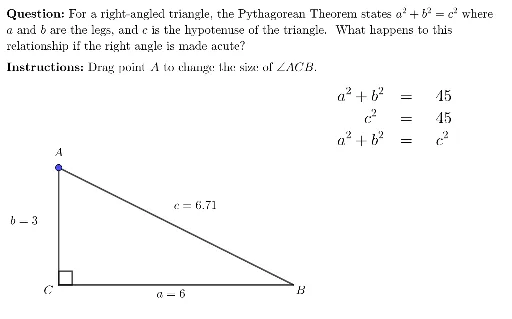
This example demonstrates the application of the Pythagorean Theorem in acute triangles through dynamic visualization of the relationships among the sides of a right triangle. Key math concepts include the Pythagorean Theorem, properties of acute triangles, and dynamic geometric constructions. It utilizes commands like UnicodeToLetter, LaTeX, DynamicCoordinates, Polygon, Angle, and TableText in GeoGebra for interactive triangle creation and data display. Suitable for high school mathematics instruction and geometric intuition development, ideal for exploratory learning.
GeoGebra Commands & Parameters
UnicodeToLetter(10007) → xmarkUnicodeToLetter(10003) → cmarkLaTeX("\text{\textbf{Instructions: }Drag point \(A\) to change the size of \(\angle ACB\). }") → SpecInstrucDynamicCoordinates(AFree, If[IsInRegion[AFree, cRegion], x(AFree), x(Asave)], If[IsInRegion[AFree, cRegion], y(AFree), y(Asave)]) → APolygon(A, C, B) → t1, b, a, cLaTeX(If[aSqPlusbSq > cSq, "\textbf{\textcolor{red}>}", "="]) → relationshipLaTeX("\text{\textbf{Question: }For a right-angled triangle, the Pythagorean Theorem states \(a^2+ b^2 = c^2\) where \\\(a\) and \(b\) are the legs, and \(c\) is the hypotenuse of the triangle. What happens to this \\relationship if the right angle is made acute?}") → MainInstrucAngle(B, C, A) → αTableText({{"", "\textbf{\phantom{ >}}", ""}, {"a^2+b^2", "=", aSqPlusbSq}, {"\phantom{a^2+}c^2", "=", cSq}, {"a^2+b^2", relationship, "c^2"}}) → infoTblLaTeX(((MainInstruc * "\\") * SpecInstruc)) → allInstruc