
Pythagoras' Theorem Numerical Verification – Dynamic Triangle Sizing
Loading the math board and drawing, please wait…
In collections
Pythagoras
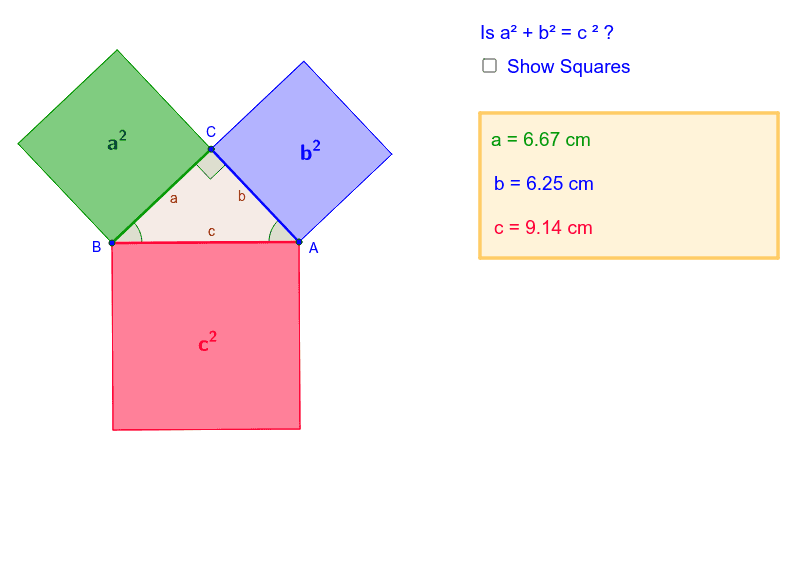
① This example demonstrates the numerical verification of the Pythagorean theorem (a² + b² = c²) by allowing users to dynamically resize a right triangle and instantly check the computed results. ② The core mathematical concept is the Pythagorean theorem and its geometric relationships among side lengths, angles, and areas in a right triangle. ③ Construction highlights: using GeoGebra commands such as Segment, Point, Polygon, Angle, OrthogonalLine, Circle, Intersect, Line, and Midpoint to build the triangle and auxiliary elements, with sliders or draggable points to adjust dimensions and update numerical outputs in real time. ④ Suitable for middle school geometry lessons, interactive demonstrations of the theorem, and student-led exploration of right-triangle side relationships.
GeoGebra Commands & Parameters
Segment(B, A) → a_2Semicircle(B, A) → c_1Point(c_1) → CPolygon(B, A, C) → poly1, c, b, aAngle(poly1) → α, β, γOrthogonalLine(C, b) → dOrthogonalLine(A, b) → eCircle(C, A) → fIntersect(f, d, 1) → DLine(D, b) → gIntersect(e, g) → EPolygon(C, A, 4) → poly2, h, i, j, k, F, GCircle(B, C) → pOrthogonalLine(B, a) → lIntersect(p, l, 1) → HLine(H, a) → mOrthogonalLine(C, m) → nPolygon(H, B, 4) → poly3, q, r, s, t, I, JCircle(B, A) → d_1OrthogonalLine(B, c) → a_1Intersect(d_1, a_1, 1) → KOrthogonalLine(K, a_1) → b_1OrthogonalLine(A, b_1) → e_1Polygon(B, K, 4) → poly4, f_1, g_1, h_1, i_1, L, MMidpoint(C, E) → NMidpoint(K, A) → OMidpoint(B, J) → POrthogonalLine(Q, xAxis) → j_1OrthogonalLine(Q, j_1) → k_1Point(k_1) → RPoint(j_1) → SOrthogonalLine(S, j_1) → l_1OrthogonalLine(R, k_1) → m_1Intersect(l_1, m_1) → TPolygon(Q, R, T, S) → poly5, q_1, r_1, t_1, s_1OrthogonalLine(U, xAxis) → n_1OrthogonalLine(V, n_1) → p_1OrthogonalLine(U, n_1) → b_2OrthogonalLine(V, b_2) → c_2Intersect(b_2, c_2) → WIntersect(n_1, p_1) → ZPolygon(U, W, V, Z) → poly6, u_1, w, v, z
AI Drawing Prompt Reference
Draw a right triangle with the hypotenuse as the diameter of a semicircle, and place a draggable point on the arc as the right-angle vertex. Construct three squares outward on each side of the triangle. Connect the outer vertices of these squares with auxiliary lines. Add an additional square outside the square on the hypotenuse, and include auxiliary rectangles aligned with the coordinate axes. Display the triangle's interior angles and dynamically compute the sum of squares of the two legs versus the square of the hypotenuse to verify the Pythagorean theorem. All elements update as the vertex is dragged.
The prompt above was compiled from the original drawing commands and is for reference only.