
Pyramid Volume Calculation
Loading the math board and drawing, please wait…
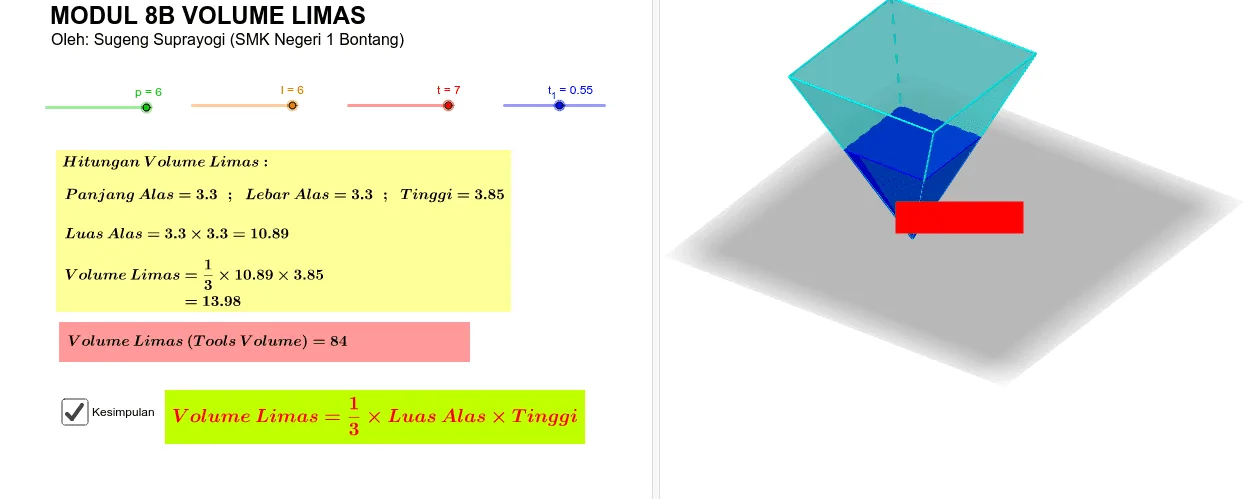
This example demonstrates the calculation of a pyramid's volume. Key mathematical concepts include the volume formula for a pyramid. Using GeoGebra commands such as Polygon, Pyramid, Segment, Point, etc., a pyramid is constructed and its volume is calculated. Suitable for high school mathematics education.
GeoGebra Commands & Parameters
Polygon(A, B, C, D) → q1, a, b, c, dPyramid(q1, (-t)) → e, E, faceABE, faceBCE, faceCDE, faceADE, edgeAE, edgeBE, edgeCE, edgeDESegment(O, A) → fSegment(O, B) → gSegment(O, C) → hSegment(O, D) → iPoint(f, t_1) → PPoint(g, t_1) → QPoint(h, t_1) → RPoint(i, t_1) → SPolygon(P, Q, R, S) → q2, p_1, q, r, sPyramid(q2, E) → j, faceEPQ, faceEQR, faceERS, faceEPS, edgeEP, edgeEQ, edgeER, edgeESSegment(P, R) → kSegment(Q, S) → mIntersect(k, m) → FSegment(F, E) → nDistance(P, Q) → PQDistance(Q, R) → QRDistance(F, O) → FOVolume(e) → volumeePoint(e) → PointeVolume(j) → volumejPoint(j) → Pointj
AI Drawing Prompt Reference
Draw a quadrilateral pyramid with a smaller similar pyramid inside. Create a quadrilateral as the base, then place a vertex above it to form a pyramid with the base vertices. Draw line segments from the base center to each corner, then mark points at equal proportions along these lines to form a smaller scaled quadrilateral. Construct a second smaller pyramid using the same apex and this inner quadrilateral as its base. Connect the diagonals of the smaller quadrilateral to find their intersection, then draw a segment from this intersection to the apex. Show the relevant distances and display the volumes of both pyramids.
The prompt above was compiled from the original drawing commands and is for reference only.