
Pyramid Unfolded
Loading the math board and drawing, please wait…
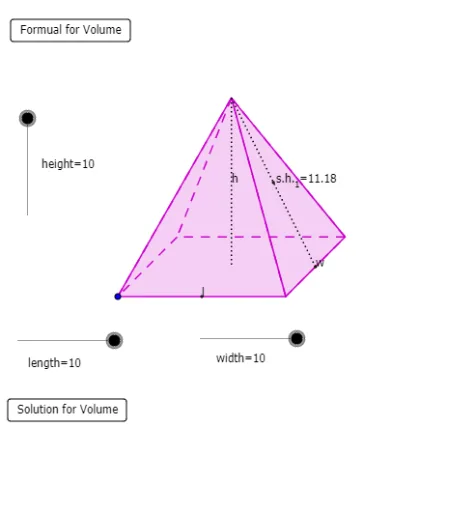
This example demonstrates the unfolded view of a pyramid. Key mathematical concepts include solid geometry and geometric construction. Using GeoGebra commands such as Line, Circle, Intersect, Vector, Translate, etc., the unfolded view of a pyramid can be constructed. Suitable for students at junior high school level and above.
GeoGebra Commands & Parameters
Line(J, K) → hCircle(J, width) → gIntersect(g, h, 1) → MVector(J, M) → wTranslate(A, Vector[w / 2]) → CDilate(I, length, H) → LVector(H, L) → vTranslate(C, v) → DMidpoint(C, D) → Q_1Translate(A, v) → BMidpoint(A, B) → YLine(Y, Q_1) → g_1Midpoint(C, B) → NCircle(Q_1, N) → k_1Intersect(k_1, g_1, 2) → V_1Dilate(F, height, E) → GVector(E, G) → uTranslate(N, u) → OPolygon(A, B, D, C) → P, a, b, d, cPolygon(O, C, D) → Q, d_1, o, c_1Polygon(O, A, C) → R, c_2, o_1, a_1Polygon(O, D, B) → S, b_1, o_2, d_2Polygon(O, A, B) → T, b_2, o_3, a_2Midpoint(B, D) → USegment(O, N) → eSegment(O, U) → fMidpoint(O, U) → WMidpoint(O, N) → VIf(height ≤ 5, C) → ZSegment(Z, O) → iSegment(Z, A) → jLine(N, U) → kIntersect(k, c) → E_1OrthogonalLine(E_1, k) → lOrthogonalLine(U, k) → mCircle(E_1, width / 2) → pIntersect(p, l, 2) → F_1OrthogonalLine(F_1, l) → nIntersect(p, l, 1) → G_1OrthogonalLine(G_1, l) → qIntersect(m, n) → H_1Intersect(m, q) → I_1Midpoint(F_1, H_1) → J_1Midpoint(I_1, G_1) → K_1Line(J_1, K_1) → rCircle(E_1, A1) → sMidpoint(H_1, I_1) → L_1Circle(U, A1) → tIntersect(s, k, 1) → M_1Intersect(t, k, 2) → N_1Circle(J_1, A2) → e_1Circle(K_1, A2) → f_1Intersect(e_1, r, 1) → O_1Intersect(f_1, r, 2) → P_1Vector(O, M_1) → z_1Vector(O, N_1) → i_1Midpoint(Q_1, N) → R_1Midpoint(Y, N) → S_1Circle(S_1, O) → q_1Intersect(q_1, g_1, 1) → T_1Vector(T_1, P_1) → u_1Vector(O, T_1) → w_1Vector(A, G_1) → l_1Vector(B, I_1) → n_1Vector(D, H_1) → r_1Circle(V_1, O) → h_1Vector(C, F_1) → s_1Intersect(h_1, g_1, 2) → U_1Vector(O, U_1) → zVector(U_1, O_1) → j_1CircleArc(S_1, O, T_1) → p_1CircleArc(V_1, U_1, O) → t_1CircumcircleArc(M_1, O, N_1) → e_2Center(e_2) → W_1Translate(O, Vector[(w_1 * m_1)]) → O'Translate(O, Vector[(z_1 * (m_1 - 1))]) → O'_1Translate(O, Vector[(z * (m_1 - 2))]) → O'_2Translate(O, Vector[(i_1 * (m_1 - 3))]) → O'_3Translate(T_1, Vector[(u_1 * (m_1 - 4))]) → Z_1Translate(U_1, Vector[(j_1 * (m_1 - 4))]) → A_2Ray(S_1, O') → f_2Intersect(p_1, f_2, 1) → C_2If(m_1 ≤ 0, O, If[m_1 < 1, C_2, If[m_1 < 4, T_1, If[m_1 < 5, Z_1, P_1]]]) → B_2Ray(W_1, O'_1) → g_2Intersect(e_2, g_2, 1) → D_2If(m_1 ≤ 1, O, If[m_1 < 2, D_2, M_1]) → E_2Ray(W_1, O'_3) → h_2Intersect(e_2, h_2, 1) → F_2If(m_1 ≤ 3, O, If[m_1 < 4, F_2, N_1]) → G_2Ray(V_1, O'_2) → i_2Intersect(t_1, i_2, 1) → H_2If(m_1 ≤ 2, O, If[m_1 < 3, H_2, If[m_1 < 4, U_1, If[m_1 < 5, A_2, O_1]]]) → I_2Translate(A, Vector[(l_1 * (m_1 - 4))]) → A'Translate(B, Vector[(n_1 * (m_1 - 4))]) → B'Translate(D, Vector[(r_1 * (m_1 - 4))]) → D'Translate(C, Vector[(s_1 * (m_1 - 4))]) → C'If(m_1 ≤ 4, A, If[m_1 < 5, A', G_1]) → J_2If(m_1 ≤ 4, C, If[m_1 < 5, C', F_1]) → K_2If(m_1 ≤ 4, D, If[m_1 < 5, D', H_1]) → L_2If(m_1 ≤ 4, B, If[m_1 < 5, B', I_1]) → M_2Polygon(E_2, K_2, J_2) → poly1, j_2, e_3, k_2Polygon(J_2, M_2, B_2) → poly2, b_3, j_3, m_2Polygon(M_2, G_2, L_2) → poly3, l_2, m_3, g_3Polygon(L_2, I_2, K_2) → poly4, k_3, l_3, i_3Polygon(K_2, J_2, M_2, L_2) → poly5, k_4, j_4, m_4, l_4Segment(U, G_2) → n_2Midpoint(U, G_2) → N_2Midpoint(O, U) → O_2Vector(P_2, N_2) → u_2Vector(P_2, O_2) → v_2Segment(N, O) → p_2Midpoint(O, N) → Q_2Segment(A, O) → q_2Segment(B, O) → r_2Segment(D, O) → t_2Segment(C, O) → a_3Segment(U, O) → c_3Midpoint(K_2, L_2) → R_2Segment(R_2, A_2) → d_3Midpoint(Q_2, I_2) → S_2Vector(T_2, S_2) → w_2Segment(J_2, K_2) → f_3
AI Drawing Prompt Reference
Draw an unfolded view of a pyramid. Start with a rectangular base, then construct a semicircle along one side to determine the position of a lateral triangle. Translate the base vertices by specific vectors to form the unfolded triangular faces, connecting them in sequence. Add auxiliary lines near the base center to locate the apex, and draw segments from the apex to the base edges. Finally, include a circular auxiliary figure beside the base to illustrate the unfolding process. The final image shows the rectangular base, four triangular faces, auxiliary segments, and a circle, demonstrating the geometric relationship between the solid and its net.
The prompt above was compiled from the original drawing commands and is for reference only.