
Pyramid in a Cube by Nicolas ERDRICH
Loading the math board and drawing, please wait…
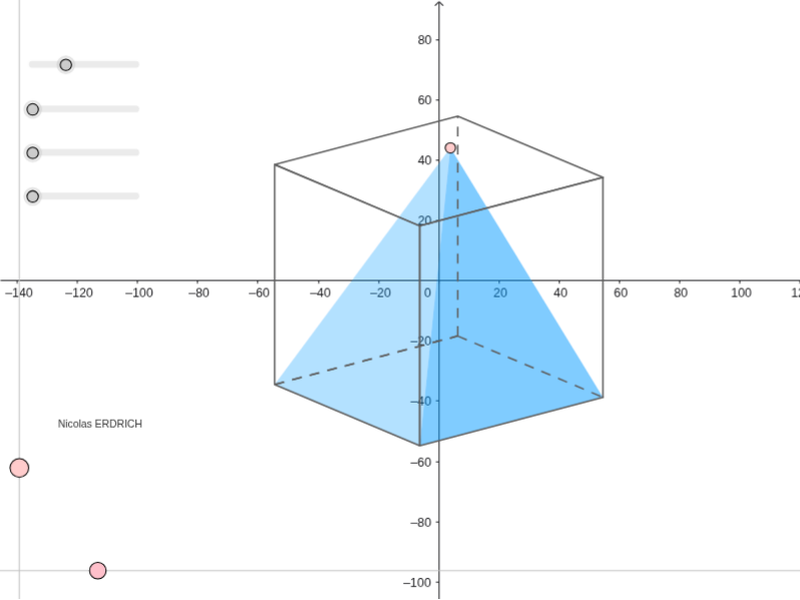
This example demonstrates constructing a pyramid inside a cube, involving core concepts in solid geometry such as centroids, orthogonal lines, and angle calculations. It utilizes commands like OrthogonalLine, Point, Sequence, Element, Polygon, Segment, and PointIn. Suitable for high school geometry education, helping students understand spatial constructions and properties.
GeoGebra Commands & Parameters
OrthogonalLine(I, xAxis) → l_1OrthogonalLine(I, l_1) → m_1Point(m_1) → KPoint(l_1) → PSequence(Mat * Element[cube, k], k, 1, 8) → cube'Element(Element[AE, 3], 1) → droiteSequence((Element[cube', k, 1, 1], Element[cube', k, 2, 1]), k, 1, 8) → listepointsPoint(listepoints) → APoint(listepoints) → EPoint(listepoints) → C_1Point(listepoints) → DPolygon(A, E, C_1, D) → poly1, a_1, b, c_1, dPoint(listepoints) → BPoint(listepoints) → FPoint(listepoints) → GPoint(listepoints) → HPolygon(B, F, G, H) → poly2, e, f, g, hPoint(listepoints) → CPolygon(F, C, A, B) → poly3, f_1, i, a_2, b_1Element(AB, 3, 1) → avantPolygon(C_1, G, H, E) → poly4, c_2, g_1, h_1, e_1Element(AC, 3, 1) → dessusPolygon(F, C, C_1, G) → poly5, f_2, c_3, c_4, g_2Polygon(A, B, H, E) → poly6, a_3, b_2, h_2, e_2Segment(E, A) → cSegment(A, C) → jSegment(A, B) → kSegment(C, C_1) → lSegment(C_1, E) → mSegment(H, E) → nSegment(A, B) → pSegment(B, H) → qSegment(H, E) → rSegment(H, G) → sSegment(B, F) → tSegment(G, C_1) → d_1Segment(F, G) → i_1Segment(F, C) → j_1PointIn(poly5) → JSegment(J, E) → k_1Polygon(J, E, H) → poly7, h_3, j_2, e_3Polygon(J, H, B) → poly8, b_3, j_3, h_4Polygon(J, E, A) → poly9, a_4, j_4, e_4Polygon(J, A, B) → poly10, b_4, j_5, a_5Angle(Line[A, E], Line[A, J]) → ang1Angle(Line[E, H], Line[E, J]) → ang2Angle(Line[H, B], Line[H, J]) → ang3Angle(Line[B, A], Line[B, J]) → ang4Polygon(A, B, H, E) → poly11, a_6, b_5, h_5, e_5Angle(Line[B, H], Line[B, A]) → ang5
AI Drawing Prompt Reference
Draw a pyramid inside a cube with its apex at the center of the cube's diagonal and base on one of its faces. Start by constructing the cube's diagonal and finding its midpoint. Use this midpoint to form the pyramid's sides, ensuring they are perpendicular to the base. The base of the pyramid should be a quadrilateral formed by four cube vertices and one midpoint. Connect the base vertices to the apex to complete the pyramid. Label all edges and vertices, and indicate the angles between the pyramid's sides and base.
The prompt above was compiled from the original drawing commands and is for reference only.