
Pyramid 2: 3D Geometry Construction and Properties
Loading the math board and drawing, please wait…
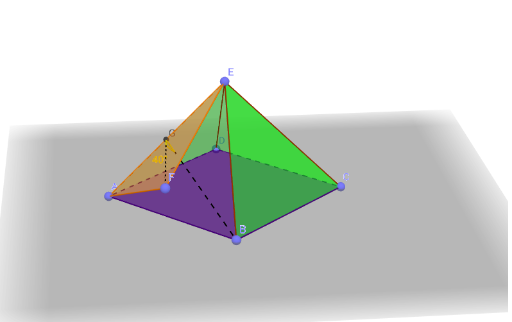
This example demonstrates the 3D structure of a pyramid, focusing on faces, edges, and vertices. Core concepts include solid geometry, polygons, angles, and centroids. Construction utilizes GeoGebra commands like Point, Polygon, Pyramid, Segment, and Angle to define vertices A, B, C, D, E and their connections. Suitable for high school geometry education or enthusiasts exploring spatial figures and geometric properties in three dimensions.
GeoGebra Commands & Parameters
Point(yAxis) → APoint(xAxis) → BPoint(yAxis) → CPoint(xAxis) → DPolygon(A, B, C, D) → poly1, a, b, c, dPoint(zAxis) → EPyramid(poly1, E) → e, faceABE, faceBCE, faceCDE, faceADE, edgeAE, edgeBE, edgeCE, edgeDECircle(edgeAE, B) → fPoint(f) → FPolygon(E, A, F) → poly2, f_1, e_1, a_1Center(f) → GSegment(F, G) → gSegment(G, B) → hAngle(B, G, F) → α
AI Drawing Prompt Reference
Draw a square pyramid with base ABCD and apex E. Start by creating points B and D on the x-axis, and points A and C on the y-axis. Connect these points to form the base quadrilateral ABCD. Then, create point E on the z-axis and connect it to each vertex of the base to form the pyramid. Next, create point F on edge AE and connect E, A, and F to form triangle EAF. Finally, connect point F to the center G of the base to form line segment FG.
The prompt above was compiled from the original drawing commands and is for reference only.