
Puzzle Square - Equilateral Triangle: Geometric Dissection
Loading the math board and drawing, please wait…
In collections
Developing games and puzzles with 3D printing for STEAM
Developing fun games and puzzles with 3D printing for STEAM
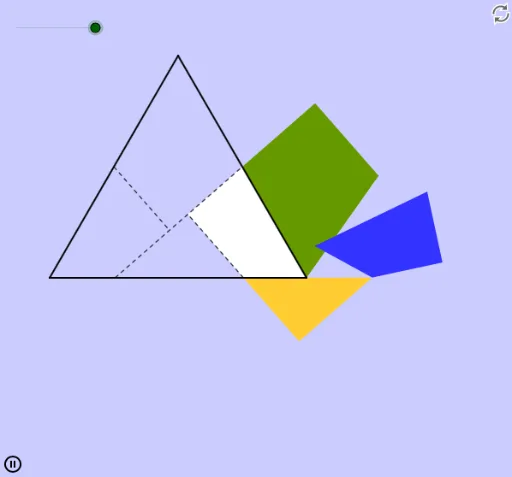
① This example presents a puzzle that demonstrates how to dissect a square and rearrange the pieces to form an equilateral triangle, sparking interest in geometric dissections. ② Core mathematical concepts include equilateral triangles, squares, geometric dissection, symmetry, and transformations. ③ Construction highlights: using GeoGebra commands such as Intersect, Point, Polygon, Segment, Midpoint, Circle, Ray, OrthogonalLine, Rotate, and Line, the construction creates multiple points, segments, polygons, and auxiliary circles, employing rotations and perpendicular lines to achieve the dissection and rearrangement. ④ Suitable for middle or high school geometry classes, math clubs, or enrichment activities, this example helps students explore area-preserving shape transformations and the beauty of geometric puzzles.
GeoGebra Commands & Parameters
Intersect(xAxis, yAxis) → APoint(xAxis) → BPolygon(A, B, 3) → poly1, a, a_1, b, CSegment(A, B) → cSegment(B, C) → dSegment(C, A) → eMidpoint(d) → DMidpoint(e) → ECircle(D, C) → fRay(A, D) → gIntersect(f, g) → F_1, FMidpoint(A, F) → GCircle(G, F) → hRay(B, C) → iIntersect(h, i) → H,Circle(D, H) → kIntersect(k, c, 1) → JCircle(J, Segment[C, D]) → pIntersect(p, c, 1) → KSegment(J, D) → jOrthogonalLine(E, j) → lIntersect(l, j) → NOrthogonalLine(K, j) → mIntersect(m, j) → RSegment(E, N) → nSegment(K, R) → qPolygon(C, D, N, E) → poly2, c_1, d_1, n_1, e_1Polygon(D, B, K, R) → poly3, d_2, b_1, k_1, rPolygon(J, K, R) → poly4, r_1, j_1, k_2Polygon(A, J, N, E) → poly5, a_2, j_2, n_2, e_2Rotate(C, (-α), D) → C'_1Rotate(D, (-α), D) → D'Rotate(N, (-α), D) → N'_1Rotate(E, (-α), D) → E'_1Polygon(C'_1, D', N'_1, E'_1) → poly2', c', d', n', e'_1Rotate(J, α, K) → J'_1Rotate(K, α, K) → K'Rotate(R, α, K) → R'Polygon(J'_1, K', R') → poly4', r', j', k'Rotate(A, α, K') → A'Rotate(J, α, K') → J'Rotate(N, α, K') → N'Rotate(E, α, K') → E'Polygon(A', J', N', E') → poly5', a', j'_1, n'_1, e'Intersect(b, e) → IIntersect(a_1, d) → LIntersect(b, e) → MIntersect(a_1, d) → OPoint(poly1) → PLine(N, R) → sCircle(D', N') → tLine(N, D') → f_1Circle(D', N) → g_1Intersect(g_1, f_1, 2) → QPolygon(Q, R, 4) → poly6, q_1, r_2, h_1, i_1, S, TCircle(Q, D') → p_1Point(poly6) → UPolygon(D', Q, U, B) → poly7, d'_1, q_2, u, b_2Circle(K', J) → s_1Point(poly6) → VPolygon(K', V, S) → poly8, s_2, k'_1, vPolygon(B, U, T, V) → poly9, b_3, u_1, t_1, v_1Rotate(B, α - 360°, V) → B'Rotate(U, α - 360°, V) → U'Rotate(T, α - 360°, V) → T'Rotate(V, α - 360°, V) → V'Polygon(B', U', T', V') → poly9', b', u', t', v'
AI Drawing Prompt Reference
Draw a square and an equilateral triangle to demonstrate how to dissect the square into pieces and rearrange them to form the triangle. Start by sketching the square and the triangle, then identify key points like vertices and midpoints of sides. Next, draw auxiliary circles and lines, finding intersection points. Finally, rotate and reassemble the pieces to form the equilateral triangle, showcasing area-preserving geometric transformations.
The prompt above was compiled from the original drawing commands and is for reference only.