
Puzzle Game-5: Geometric Construction and Math Puzzle
Loading the math board and drawing, please wait…
In collections
Besondere Punkte/Special Points
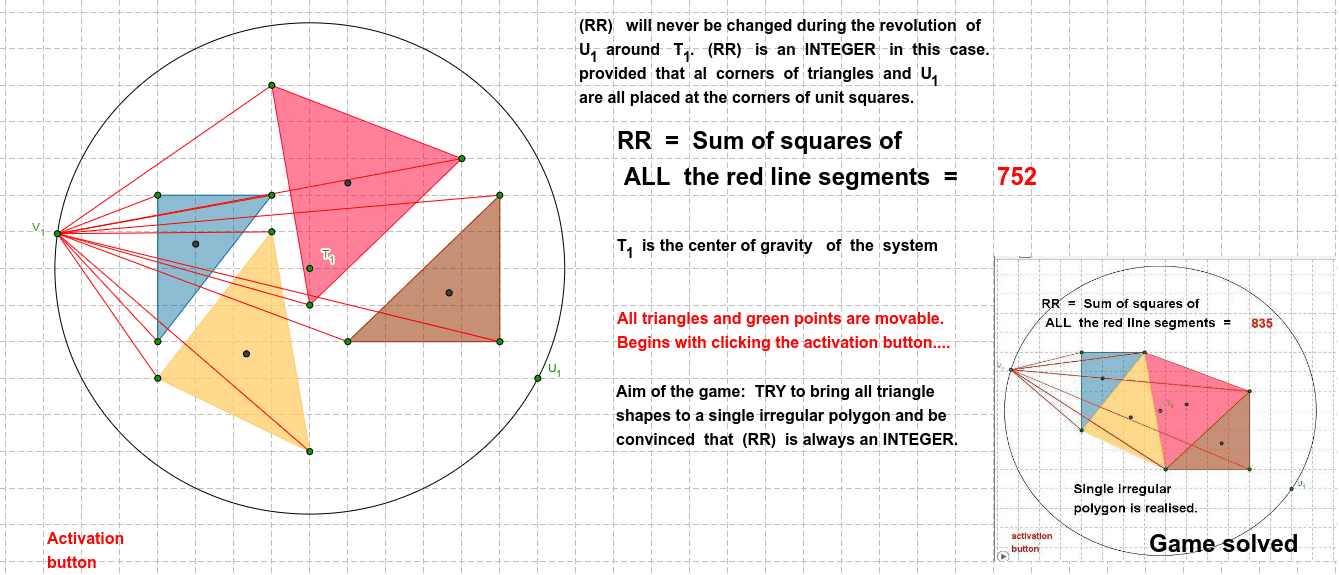
This example, titled 'Puzzle game-5', is an interactive geometric puzzle built in GeoGebra that displays multiple polygons, circles, and segments in a dynamic arrangement, inviting users to explore mathematical patterns within geometric constructions. The core mathematical concepts involve polygons, circles, line segments, intersection points, midpoints, and fundamental geometric construction principles, while also touching on extended themes such as matrices, the unit circle, and least common multiple/greatest common divisor as suggested by the original tags. The construction uses GeoGebra commands including Polygon to create several polygons (poly1, poly2, poly3), Midpoint for midpoints, Segment for connecting lines, Intersect for finding intersection points, Circle for drawing circles, and Point for defining key points. The object list includes points A through S, segments a through n, and circle c, forming a complex geometric network. This example is suitable for middle school or introductory geometry learning, serving as a classroom exploration or fun puzzle to help students understand relationships among geometric elements and construction logic, while enhancing spatial reasoning and problem-solving skills.
GeoGebra Commands & Parameters
Polygon(A, B, C) → poly1, c, a, bPolygon(D, E, F) → poly2, f, d, ePolygon(G, H, I) → poly3, ı, g, hMidpoint(A, C) → KMidpoint(A, B) → LSegment(K, B) → iSegment(L, C) → jIntersect(i, j) → MMidpoint(D, F) → NMidpoint(F, E) → OSegment(N, E) → kSegment(O, D) → lIntersect(k, l) → PMidpoint(G, H) → QMidpoint(G, I) → RSegment(R, H) → mSegment(Q, I) → nIntersect(m, n) → SSegment(M, S) → pSegment(S, P) → qSegment(P, M) → rMidpoint(M, S) → TMidpoint(S, P) → USegment(M, U) → sSegment(T, P) → tPolygon(D_1, E_1, F_1) → poly2_1, f_1, d_1, e_1Midpoint(D_1, F_1) → N_1Midpoint(F_1, E_1) → O_1Midpoint(A, B) → VMidpoint(A, C) → WSegment(V, C) → a_1Segment(W, B) → b_1Midpoint(D, F) → A_1Midpoint(D, E) → B_1Segment(A_1, E) → c_1Segment(B_1, F) → g_1Intersect(a_1, b_1) → C_1Intersect(c_1, g_1) → G_1Midpoint(G, H) → H_1Midpoint(G, I) → I_1Segment(H, I_1) → h_1Segment(H_1, I) → i_1Intersect(h_1, i_1) → J_1Midpoint(D_1, F_1) → K_1Midpoint(F_1, E_1) → L_1Segment(D_1, L_1) → j_1Segment(K_1, E_1) → k_1Intersect(j_1, k_1) → M_1Midpoint(C_1, G_1) → P_1Midpoint(J_1, M_1) → Q_1Midpoint(C_1, J_1) → R_1Midpoint(G_1, M_1) → S_1Segment(P_1, Q_1) → l_1Segment(R_1, S_1) → m_1Intersect(l_1, m_1) → T_1Circle(T_1, U_1) → p_1Point(p_1) → V_1Segment(V_1, A) → n_1Segment(V_1, B) → q_1Segment(V_1, C) → r_1Segment(V_1, H) → s_1Segment(V_1, G) → t_1Segment(V_1, I) → a_2Segment(D, V_1) → b_2Segment(V_1, E) → c_2Segment(V_1, F) → d_2Segment(D_1, V_1) → e_2Segment(E_1, V_1) → f_2Segment(F_1, V_1) → g_2
AI Drawing Prompt Reference
Draw three triangles. For each triangle, connect each vertex to the midpoint of the opposite side, forming medians that intersect at a centroid. In the first triangle, take midpoints of two sides, connect them to the opposite vertices, and mark their intersection as the centroid. Repeat for the second and third triangles to get three centroids. Connect these three centroids with segments to form a new triangle. Then, for this new triangle, take midpoints of two sides, connect them to opposite vertices, and mark the intersection as its centroid. Additionally, to the right, draw a congruent copy of the second triangle and repeat the median construction to get another centroid. The final figure shows multiple triangles, medians, intersection points, and connecting segments, forming a geometric puzzle.
The prompt above was compiled from the original drawing commands and is for reference only.