
Pulling a Box on a Horizontal Surface: Static vs. Kinetic Friction
Loading the math board and drawing, please wait…
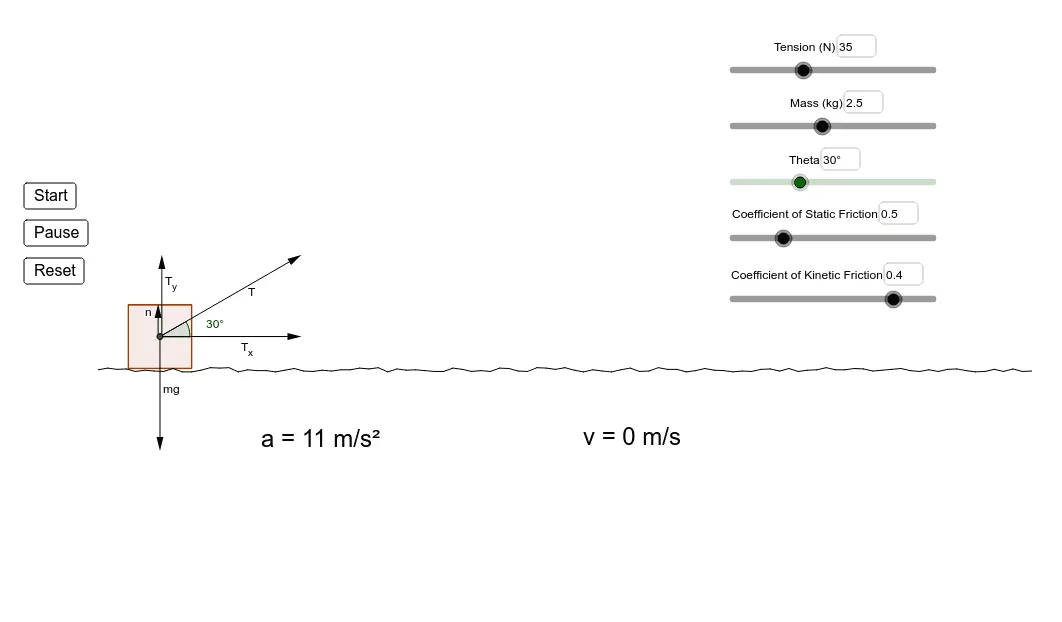
This simulation models a box being pulled along a horizontal surface by a rope, letting students examine how friction changes from the pre-motion (static) regime to the motion (kinetic) regime. As the rope’s direction and applied force vary, the model updates whether the rope “overcomes” the static friction limit and how the resulting friction force affects acceleration and velocity. The example’s key mathematics includes a conditional, piecewise decision based on the static friction maximum (If), directional modeling using vectors and angles (Vector, Angle), and geometric construction of force diagrams and reference directions (Segment, Polygon, Midpoint), along with dynamic readouts via text fields (Textfield) for parameters such as μ_s, μ_k, normal, f_k, f_s,max, and time/velocity variables. Suitable for secondary to early college levels, it supports instruction in modeling with piecewise logic, vector geometry, and interpreting physics quantities through geometric representations.
GeoGebra Commands & Parameters
If((m * g) > (F * sin(θ)), (m * 9.8) - (F * sin(θ)), 0) → normalPolygon(A, B, 4) → poly1, a, b, c, d, C, DSegment(B, D) → eSegment((A1, B1), (A2, B2)) → C2Segment((A2, B2), (A3, B3)) → C3Segment((A3, B3), (A4, B4)) → C4Segment((A4, B4), (A5, B5)) → C5Segment((A5, B5), (A6, B6)) → C6Segment((A6, B6), (A7, B7)) → C7Segment((A7, B7), (A8, B8)) → C8Segment((A8, B8), (A9, B9)) → C9Segment((A9, B9), (A10, B10)) → C10Segment((A10, B10), (A11, B11)) → C11Segment((A11, B11), (A12, B12)) → C12Segment((A12, B12), (A13, B13)) → C13Segment((A13, B13), (A14, B14)) → C14Segment((A14, B14), (A15, B15)) → C15Segment((A15, B15), (A16, B16)) → C16Segment((A16, B16), (A17, B17)) → C17Segment((A17, B17), (A18, B18)) → C18Segment((A18, B18), (A19, B19)) → C19Segment((A19, B19), (A20, B20)) → C20Segment((A20, B20), (A21, B21)) → C21Segment((A21, B21), (A22, B22)) → C22Segment((A22, B22), (A23, B23)) → C23Segment((A23, B23), (A24, B24)) → C24Segment((A24, B24), (A25, B25)) → C25Segment((A25, B25), (A26, B26)) → C26Segment((A26, B26), (A27, B27)) → C27Segment((A27, B27), (A28, B28)) → C28Segment((A28, B28), (A29, B29)) → C29Segment((A29, B29), (A30, B30)) → C30Segment((A30, B30), (A31, B31)) → C31Segment((A31, B31), (A32, B32)) → C32Segment((A32, B32), (A33, B33)) → C33Segment((A33, B33), (A34, B34)) → C34Segment((A34, B34), (A35, B35)) → C35Segment((A35, B35), (A36, B36)) → C36Segment((A36, B36), (A37, B37)) → C37Segment((A37, B37), (A38, B38)) → C38Segment((A38, B38), (A39, B39)) → C39Segment((A39, B39), (A40, B40)) → C40Segment((A40, B40), (A41, B41)) → C41Segment((A41, B41), (A42, B42)) → C42Segment((A42, B42), (A43, B43)) → C43Segment((A43, B43), (A44, B44)) → C44Segment((A44, B44), (A45, B45)) → C45Segment((A45, B45), (A46, B46)) → C46Segment((A46, B46), (A47, B47)) → C47Segment((A47, B47), (A48, B48)) → C48Segment((A48, B48), (A49, B49)) → C49Segment((A49, B49), (A50, B50)) → C50Segment((A50, B50), (A51, B51)) → C51Segment((A51, B51), (A52, B52)) → C52Segment((A52, B52), (A53, B53)) → C53Segment((A53, B53), (A54, B54)) → C54Segment((A54, B54), (A55, B55)) → C55Segment((A55, B55), (A56, B56)) → C56Segment((A56, B56), (A57, B57)) → C57Segment((A57, B57), (A58, B58)) → C58Segment((A58, B58), (A59, B59)) → C59Segment((A59, B59), (A60, B60)) → C60Segment((A60, B60), (A61, B61)) → C61Segment((A61, B61), (A62, B62)) → C62Segment((A62, B62), (A63, B63)) → C63Segment((A63, B63), (A64, B64)) → C64Segment((A64, B64), (A65, B65)) → C65Segment((A65, B65), (A66, B66)) → C66Segment((A66, B66), (A67, B67)) → C67Segment((A67, B67), (A68, B68)) → C68Segment((A68, B68), (A69, B69)) → C69Segment((A69, B69), (A70, B70)) → C70Segment((A70, B70), (A71, B71)) → C71Segment((A71, B71), (A72, B72)) → C72Segment((A72, B72), (A73, B73)) → C73Segment((A73, B73), (A74, B74)) → C74Segment((A74, B74), (A75, B75)) → C75Segment((A75, B75), (A76, B76)) → C76Segment((A76, B76), (A77, B77)) → C77Segment((A77, B77), (A78, B78)) → C78Segment((A78, B78), (A79, B79)) → C79Segment((A79, B79), (A80, B80)) → C80Segment((A80, B80), (A81, B81)) → C81Segment((A81, B81), (A82, B82)) → C82Segment((A82, B82), (A83, B83)) → C83Segment((A83, B83), (A84, B84)) → C84Segment((A84, B84), (A85, B85)) → C85Segment((A85, B85), (A86, B86)) → C86Segment((A86, B86), (A87, B87)) → C87Segment((A87, B87), (A88, B88)) → C88Segment((A88, B88), (A89, B89)) → C89Segment((A89, B89), (A90, B90)) → C90Segment((A90, B90), (A91, B91)) → C91Segment((A91, B91), (A92, B92)) → C92Segment((A92, B92), (A93, B93)) → C93Segment((A93, B93), (A94, B94)) → C94Segment((A94, B94), (A95, B95)) → C95Segment((A95, B95), (A96, B96)) → C96Segment((A96, B96), (A97, B97)) → C97Segment((A97, B97), (A98, B98)) → C98Segment((A98, B98), (A99, B99)) → C99Segment((A99, B99), (A100, B100)) → C100Segment((A100, B100), (A101, B101)) → C101Midpoint(e) → EVector(E, H) → vIf(F > ((μ_s * m) * g), fk, fsmax) → fVector(E, (x(E) + (F * cos(θ) / 20), y(E))) → T_xVector((x(E) + 0.02, y(E)), (x(E) + 0.02, y(E) + (F * sin(θ) / 20))) → T_yVector(E, (x(E) + (F * cos(θ) / 20), y(E) + (F * sin(θ) / 20))) → TVector(E, (x(E), y(E) - (m * 9.8 / 20))) → mgVector((x(E) - 0.02, y(E)), (x(E) - 0.02, y(E) + Length[mg] - Length[T_y])) → nVector(E, H2) → uIf(vel > 0, ((F * cos(θ)) - fk) / m, If[fsmax > (F * cos(θ)), 0, ((F * cos(θ)) - fk) / m]) → accIf((F * sin(θ)) ≥ (m * g), true, false) → upAngle(T_x, T) → αTextfield(F) → inputBox1Textfield(m) → inputBox2Textfield(θ) → inputBox3Textfield(μ_s) → inputBox4Textfield(μ_k) → inputBox5
AI Drawing Prompt Reference
Draw a diagram simulating a box being pulled on a horizontal surface. The diagram should include a horizontal surface, a box, a rope connecting the box to a fixed point, and a force diagram showing static and kinetic friction. The construction order should be: first draw the horizontal surface, then place the box, then draw the rope, and finally add the force diagram to illustrate the direction and magnitude of friction. The diagram should reflect the difference between static and kinetic friction and how the pulling force affects motion.
The prompt above was compiled from the original drawing commands and is for reference only.