
Properties of Dilations by Jeff Hamilton
Loading the math board and drawing, please wait…
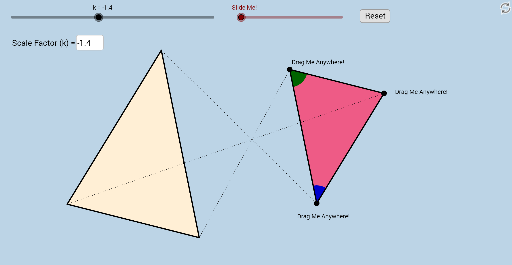
This example demonstrates the properties of dilations. It involves core concepts of similarity transformations, including scaling shapes. Using GeoGebra commands such as Dilate, Vector, Translate, and Rotate, the effect of similarity transformations can be constructed. Suitable for middle and high school students learning geometric transformations.
GeoGebra Commands & Parameters
Polygon(A, B, C) → poly1, c, a, bSegment(A, B) → dSegment(B, C) → eSegment(C, A) → fTextfield(k) → InputBox1Dilate(A, k, O) → A'Dilate(B, k, O) → B'Dilate(C, k, O) → C'Polygon(A', B', C') → poly1', c', a', b'Dilate(A, k, O) → A'_1Dilate(B, k, O) → B'_1Segment(A'_1, B'_1) → d'Dilate(B, k, O) → B'_2Dilate(C, k, O) → C'_1Segment(B'_2, C'_1) → e'Dilate(C, k, O) → C'_2Dilate(A, k, O) → A'_2Segment(C'_2, A'_2) → f'Segment(O, A') → gSegment(O, A) → hSegment(O, B) → iSegment(O, B') → jSegment(O, C') → lSegment(O, C) → mCircle(A, 1) → pCircle(B, 1) → sIntersect(p, f, 1) → DIntersect(p, d, 1) → EIntersect(s, d, 1) → FIntersect(s, e, 1) → GCircleSector(A, D, E) → tCircleSector(B, F, G) → c_1Dilate(A, If[0 < n ≤ 1, 1 - n, 0], A') → A'_3Dilate(B, If[1 < n ≤ 2, 2 - n, 0], B') → B'_3Vector(B, B'_3) → uVector(A, A'_3) → vTranslate(t, v) → t'Translate(c_1, u) → d_1Angle(D, A, E) → αCircleSector(A, E, D) → e_1CircleSector(B, G, F) → f_1Translate(e_1, v) → g_1Translate(f_1, u) → h_1Dilate(A, If[0 < o ≤ 1, 1 - o, 0], A') → A'_4Vector(A, A'_4) → wDilate(B, If[2 < o ≤ 3, 3 - o, 0], B') → B'_4Vector(B, B'_4) → qTranslate(e_1, w) → rRotate(r, If[1 < o ≤ 2, (((o - 1) * 180))°, 180°], A') → r'Translate(f_1, q) → k_1Rotate(k_1, If[3 < o ≤ 4, (((o - 3) * 180))°, 180°], B') → p_1Translate(t, w) → t'_1Rotate(t'_1, If[1 < o ≤ 2, (((o - 1) * 180))°, 180°], A') → q_1Translate(c_1, q) → r_1Rotate(r_1, If[3 < o ≤ 4, (((o - 3) * 180))°, 180°], B') → s_1
AI Drawing Prompt Reference
Draw a triangle and dilate it about an external center point to form a second triangle. Connect the center to corresponding vertices and show the original and dilated sides. Place small circles at two vertices of the original triangle, intersecting adjacent sides to create two circular sectors, which translate during the dilation. Include an input box for the scale factor and two sliders to animate different stages of the transformation.
The prompt above was compiled from the original drawing commands and is for reference only.