
Properties of a Parallelogram
Loading the math board and drawing, please wait…
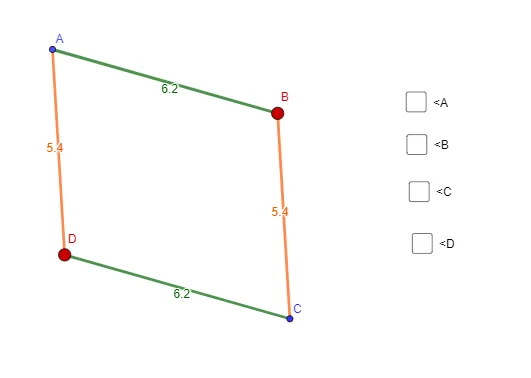
This example demonstrates the properties of a parallelogram. Key mathematical concepts include parallel lines, diagonal properties, and angle relationships. Using GeoGebra commands such as Segment, Line, and Intersect, the construction process is dynamically shown. Suitable for middle school and above students to learn geometric construction and property exploration.
GeoGebra Commands & Parameters
Segment(A, B) → fLine(D, f) → gSegment(A, D) → hLine(B, h) → iIntersect(i, g) → CSegment(D, C) → jSegment(B, C) → kAngle(D, A, B) → αAngle(A, B, C) → βAngle(B, C, D) → γAngle(C, D, A) → δ
AI Drawing Prompt Reference
Draw a parallelogram by first creating a base segment. From one endpoint of the base, draw a line parallel to the base. From the other endpoint, draw a slanted side. Then through the far end of that slanted side, draw a line parallel to the slanted side, intersecting the first parallel line to form the fourth vertex. Connect this vertex to both endpoints of the base to complete the parallelogram. Finally, mark the four interior angles at each vertex with angle symbols to show that opposite angles are equal and adjacent angles are supplementary.
The prompt above was compiled from the original drawing commands and is for reference only.