
Quadrilateral Properties: Rhombus Construction and Exploration
Loading the math board and drawing, please wait…
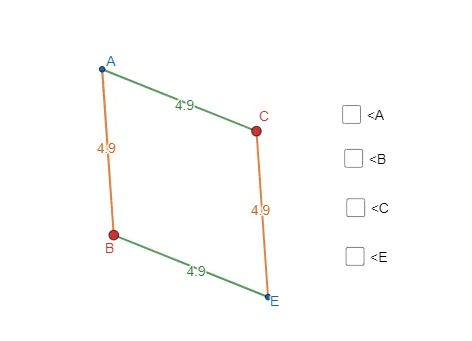
This GeoGebra example dynamically demonstrates the properties of a rhombus by constructing a quadrilateral with all sides equal using circles and segments. The core mathematical concepts include the definition of a rhombus (a parallelogram with four congruent sides), diagonal perpendicularity, opposite angle equality, and symmetry. Construction steps: use the Segment command to create segment AB, draw a circle c centered at A with radius AB, pick point C on the circle, then draw another circle centered at C with radius CB; the intersection of the two circles determines point D, and connecting the vertices forms the quadrilateral. The Angle command marks interior angles α, β, γ, δ, and the Intersect command finds the diagonal intersection E, allowing verification of rhombus properties. This resource is suitable for middle school geometry lessons or high school review, helping students intuitively understand rhombus criteria and properties, and explore how angles and diagonals change when side length varies.
GeoGebra Commands & Parameters
Segment(A, B) → fCircle(A, B) → cPoint(c) → CSegment(A, C) → gCircle(B, A) → dCircle(C, A) → eIntersect(e, d) → D, E, ,Segment(B, E) → hSegment(C, E) → iAngle(B, A, C) → αAngle(A, C, E) → βAngle(C, E, B) → γAngle(E, B, A) → δ
AI Drawing Prompt Reference
Draw a rhombus by constructing it with two circles and segments. Start with a segment, draw a circle with the segment as radius, pick a point on the circle, then draw another circle centered at that point with the same radius. The intersection points of the two circles determine the fourth vertex. Connect the four points to form the rhombus, label the interior angles and the intersection point of the diagonals to demonstrate perpendicularity, bisecting each other, and equal opposite angles.
The prompt above was compiled from the original drawing commands and is for reference only.