
Product Rule
Loading the math board and drawing, please wait…
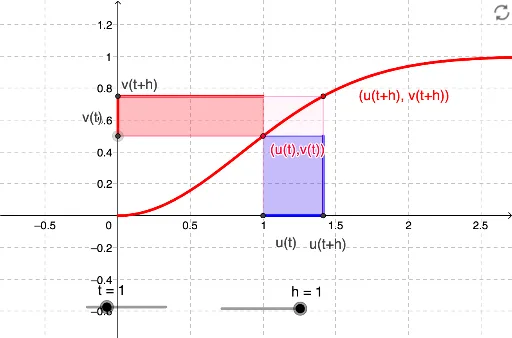
This example illustrates the application of the product rule in differentiation. Key mathematical concepts include derivatives and the product of functions. Using GeoGebra commands such as CurveCartesian and Intersect, the product of two functions and their derivatives are constructed. Suitable for high school and above students learning calculus.
GeoGebra Commands & Parameters
CurveCartesian(u(t), v(t), t, 0, 10) → aOrthogonalLine(A, xAxis) → bOrthogonalLine(A, yAxis) → cOrthogonalLine(B, xAxis) → dOrthogonalLine(B, yAxis) → eIntersect(b, e) → CIntersect(c, d) → DIntersect(d, xAxis) → EIntersect(b, xAxis) → FIntersect(e, yAxis) → GIntersect(c, yAxis) → HIntersect(yAxis, xAxis) → IPolygon(G, H, A, C) → poly1, f, g, i, jPolygon(F, A, D, E) → poly2, k, l, m, nPolygon(H, A, F, E, B, G) → poly3, h_1, a_1, f_1, e_1, b_1, g_1Segment(G, H) → pSegment(F, E) → q
AI Drawing Prompt Reference
Draw the graphs of two functions and their derivatives, and construct geometric shapes using intersections. First, draw the graphs of the functions and their derivatives, then find the intersections of these graphs, and finally use these intersections to construct three polygons and two line segments.
The prompt above was compiled from the original drawing commands and is for reference only.