
Prism Demo
Loading the math board and drawing, please wait…
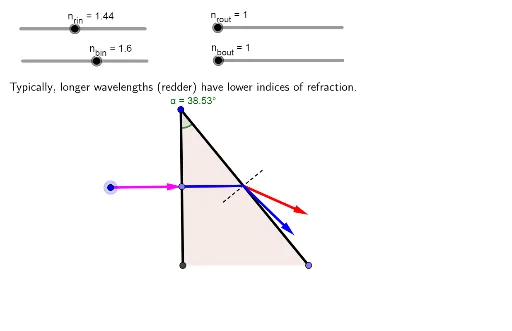
This example demonstrates the geometric construction and properties of a prism, involving core concepts like solid geometry, vector operations, conditional probability, and complex numbers. It utilizes commands such as Point, Intersect, Segment, Slope, CircleSector, PointIn, Vector, Angle, Rotate, Ray, LaTeX, and Polygon in GeoGebra for construction. Suitable for high school students and math enthusiasts exploring geometric bodies and probability statistics applications.
GeoGebra Commands & Parameters
Point(xAxis) → BIntersect(xAxis, yAxis) → ASegment(C, A) → cSlope(c) → m_cPoint(c) → DCircleSector(D, D - (Length[c] * (1, -1 / m_c)), A) → kSegment(C, B) → bPointIn(k) → EVector(E, D) → uSlope(b) → m_bSegment(D_{plus}, D_{minus}) → aAngle(E, D, D_{minus}) → daRotate(D_{plus}, (db / 180 * π), D) → FRay(D, F) → dIntersect(d, b) → GSegment(D, G) → eSegment(G_{minus}, G_{plus}) → fAngle(D, G, G_{minus}) → gaRotate(G_{plus}, (((-gb)) / 180 * π), G) → HVector(G, G + (Vector[G, H] / Length[Vector[G, H]] * Length[u])) → gRotate(D_{plus}, (db2 / 180 * π), D) → IRay(D, I) → hIntersect(h, b) → JSegment(J_{minus}, J_{plus}) → iAngle(D, J, J_{minus}) → jaRotate(J_{plus}, (((-jb)) / 180 * π), J) → KVector(J, J + (Vector[J, K] / Length[Vector[J, K]] * Length[u])) → wSegment(D, J) → jLaTeX("\text{Typically, longer wavelengths (redder) have lower indices of refraction.}") → text1Polygon(A, C, B) → t1, b_1, a_1, c_1Angle(A, C, B) → α