
Prism Cross Sections Dynamic Demonstration
Loading the math board and drawing, please wait…
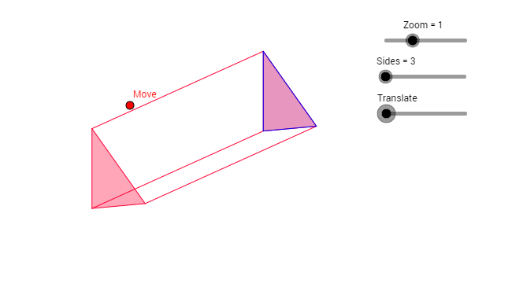
This example demonstrates the dynamic properties of cross-sections within a prism. It covers solid geometry concepts including polygon cross-sections, vector translation, and spatial visualization. Construction utilizes GeoGebra commands such as Vector, Sequence, Polygon, Centroid, and Translate to create an interactive model. Suitable for high school geometry education, spatial reasoning practice, and exploring how plane intersections affect prism shapes.
GeoGebra Commands & Parameters
Vector(B, C) → vVector(B, E) → uVector(B, D) → wSequence(F - ((2 * w) * Zoom) + (Zoom * ((sin(i°) * v) - (cos(i°) * u))), i, 0, 360, 360 / Sides) → list2Polygon(list2) → poly2Centroid(poly2) → HSequence(F + ((2 * w) * Zoom) + (Zoom * ((sin(i°) * v) - (cos(i°) * u))), i, 0, 360, 360 / Sides) → list1Polygon(list1) → poly1Centroid(poly1) → GSequence(Segment[Element[list1, i], Element[list2, i]], i, 0, Sides) → list3Translate(poly1, z) → poly1'
AI Drawing Prompt Reference
Draw a prism and demonstrate its various cross-sections. Start by defining the vertices of the prism's bases, then use vector translation to generate a series of new vertices, forming two parallel polygons. Finally, connect the corresponding vertices of these polygons with line segments to illustrate the dynamic properties of the prism's cross-sections.
The prompt above was compiled from the original drawing commands and is for reference only.