
Prism Addition 2
Loading the math board and drawing, please wait…
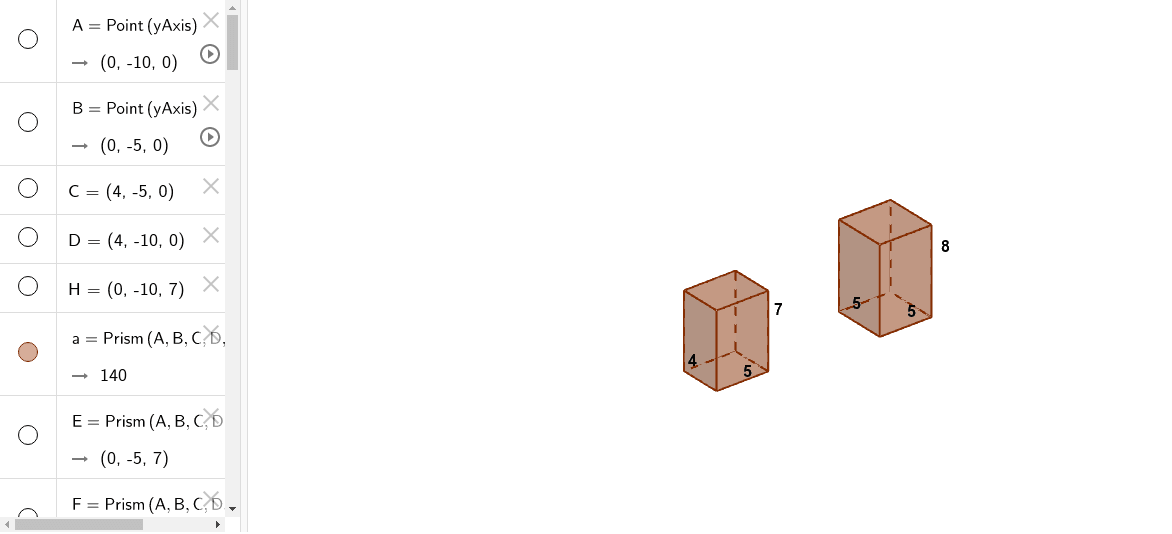
This example demonstrates the addition of prisms, involving core concepts of vectors and solid geometry. Using GeoGebra commands such as Point and Prism, various faces and edges of the prism are constructed. Suitable for high school mathematics education, particularly in solid geometry and vector courses.
GeoGebra Commands & Parameters
Point(yAxis) → APoint(yAxis) → BPrism(A, B, C, D, H) → a, E, edgeAB, edgeBC, edgeCD, edgeAD, edgeAH, edgeBE, edgeCF, edgeDG, edgeEH, edgeEF, F, edgeFG, edgeGH, G, faceABCD, faceABEH, faceBCFE, faceCDGF, faceADGH, faceEFGHPoint(yAxis) → IPoint(yAxis) → JPrism(I, J, K, L, P) → b, M, edgeIJ, edgeJK, edgeKL, edgeIL, edgeIP, edgeJM, edgeKN, edgeLO, edgeMP, edgeMN, N, edgeNO, edgeOP, O, faceIJKL, faceIJMP, faceJKNM, faceKLON, faceILOP, faceMNOP
AI Drawing Prompt Reference
Draw two rectangular prisms. The first prism has base AB with points A and B, top CD with points C and D, and vertex H. The second prism has base IJ with points I and J, top KL with points K and L, and vertex P. Sequentially draw the faces and edges of the bases and sides.
The prompt above was compiled from the original drawing commands and is for reference only.