
Powers of Complex Numbers
Loading the math board and drawing, please wait…
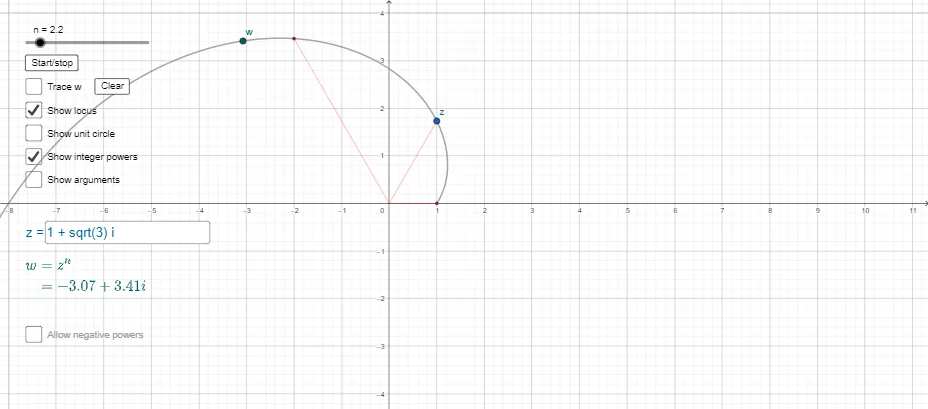
This example demonstrates the power operation of complex numbers. It shows how the power operation of complex numbers changes on the complex plane. Key mathematical concepts include complex numbers, power operations, and geometric transformations on the complex plane. Using GeoGebra commands such as Locus, Point, and Segment, the trajectory of complex number power operations can be dynamically observed. Suitable for high school mathematics education and learning complex number concepts.
GeoGebra Commands & Parameters
Locus(w, n) → loc1Textfield(a) → InputBox1Point(yAxis) → ASegment(A, a) → gSegment(A, w) → hPoint(xAxis) → BAngle(B, A, a) → αAngle(B, A, w) → βRotate(B, 1, A) → B'Angle(B, A, B') → γRotate(B, (0.5 * β), A) → B'_1Angle(B, A, B'_1) → δSegment(A, B'_1) → jPoint(j) → CRotate(B, (0.5 * α), A) → B'_2Angle(B, A, B'_2) → εSegment(A, B'_2) → kPoint(k) → DSegment(A, a_2) → lSegment(A, a) → mSegment(A, a_3) → pSegment(A, a_4) → qSegment(A, a_5) → rSegment(A, a_6) → sSegment(A, a_7) → tSegment(A, a_8) → f_1Segment(A, a_9) → g_1Segment(A, a_{10}) → h_1Segment(A, a_{11}) → i_1Segment(A, a_{12}) → j_1Segment(A, a_{13}) → k_1Segment(A, a_{14}) → l_1Segment(A, a_{15}) → m_1Segment(A, a_{16}) → n_1Segment(A, a_{17}) → p_1Segment(A, a_{18}) → q_1Segment(A, a_{19}) → r_1Segment(a_{20}, A) → s_1Point(loc1) → ESegment(A, E) → t_1
AI Drawing Prompt Reference
Draw the locus of complex number powers, select point A on the x-axis as the origin, and use slider a to control the power of complex numbers, observing how these powers change on the complex plane. Start by drawing point A, then generate a series of complex numbers using the slider, and use rotation and translation operations to dynamically show their locus. Finally, use the Locus command Locus(w, n) to generate the locus loc1.
The prompt above was compiled from the original drawing commands and is for reference only.