
Powers of Complex Numbers by Gary Rubinstein
Loading the math board and drawing, please wait…
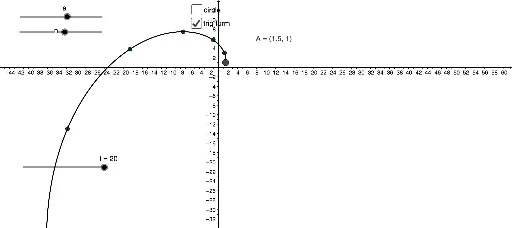
This example demonstrates the power operation of complex numbers. Key mathematical concepts include the properties of complex numbers and power operations. Using GeoGebra commands such as Circle, Intersect, CircleArc, Locus, and Sequence, the geometric representation of complex number powers can be constructed. Suitable for high school mathematics education and students learning complex number power operations.
GeoGebra Commands & Parameters
Circle(B, A) → cIntersect(c, xAxis, 2) → CCircleArc(B, C, A) → dLocus(D, i) → loc1Sequence(Point[{(cos(((i * e))°) * r^(i)), (sin(((i * e))°) * r^(i))}], i, 1, 20) → list1
AI Drawing Prompt Reference
Draw a complex plane with a unit circle centered at the origin. Mark the intersection of the circle with the positive real axis. From this point, draw a circular arc counterclockwise to another given point on the circle. Then generate a sequence of points on the plane, each determined by raising a complex number to successive integer powers: the radius of each point is the modulus of the base raised to that power, and the angle is the argument multiplied by that power. Connect these points in order to form a spiral-like locus, illustrating the geometric effect of complex number powers.
The prompt above was compiled from the original drawing commands and is for reference only.