
Positive and Negative Numbers in a Bank Account
Loading the math board and drawing, please wait…
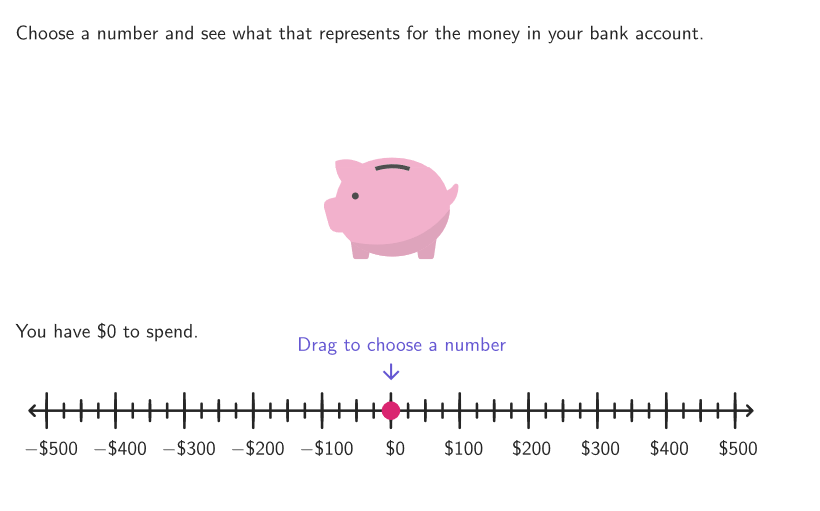
This example demonstrates the use of positive and negative numbers in the context of bank accounts. The key mathematical concepts include the representation of positive, negative, and zero on a number line, and their application in deposits and withdrawals. The construction involves GeoGebra commands such as Vector, Sequence, Point, and others to create the number line and related graphics. It is suitable for students in grades 6-8 to understand mathematical concepts through visual exploration.
GeoGebra Commands & Parameters
Vector((-35, -425), (-35, -280)) → vOutSequence(VP1 + (k / 42 * (VP2 - VP1)), k, 0, 42) → segmGridPoint(segmGrid) → SPShuffle({1, 1, 1, 1, 1, 1, 1, 1, 1, 1, 2, 2, 2, 2, 2, 2, 2, 2, 2, 2, 3, 3, 3, 3, 3, 3, 3, 3, 3, 3, 4, 4, 4, 4, 4, 4, 4, 4, 4, 4}) → exType, {3, 4, 3, 4, 4, 2, 1, 2, 4, 3, 4, 3, 2, 1, 1, 1, 2, 4, 3, 2, 1, 4, 3, 2, 1, 3, 4, 2, 1, 1, 2, 1, 2, 3, 1, 3, 3, 4, 4, 2}Shuffle(Sequence[t, t, 25, 500, 25]) → allAmounts, {400, 150, 325, 350, 275, 425, 475, 450, 225, 100, 175, 200, 75, 300, 500, 125, 50, 375, 25, 250}Mirror(P1, yAxis) → P1'Mirror(P1', xAxis) → P1''Mirror(P1'', yAxis) → P1'''Polygon(P1, P1', P1'', P1''') → peep, p1, p1', p1'', p1'''Sequence(Segment[(t, y(V1) - 15), (t, y(V1) + 15)], t, x(V1), x(V2), 50) → mediumTicksSegment(VP1, VP2) → fakeXaxisSequence(Segment[(t, y(V1) - 10), (t, y(V1) + 10)], t, x(V1), x(V2), 25) → shortTicksSequence(t, t, x(V1), x(V2), 100) → labelValuesSequence(Segment[(t, y(V1) - 25), (t, y(V1) + 25)], t, x(V1), x(V2), 100) → longTicksElement(allAmounts, Mod[amCount, Length[allAmounts]] + 1) → amountElement(exType, Mod[exCount, Length[exType]] + 1) → exNumIf(exNum ≤ 2, (amount, 0), ((-amount), 0)) → APSegment(O - (0, 650 - adjustPos), SP) → studSegmZip(Text[If[A < 0, ("-\$" * abs(A)), ("\$" * A)], B, false, true, 0, 0], A, labelValues, B, labelsGrid) → allLabelsTranslate((-35, -425), Vector[(vOut * aniSli)]) → MTranslate((30, -425), Vector[(vOut * aniSli)]) → NVector((-27, -280), (-27, -425)) → vInTranslate((-27, -280), Vector[(aniSli * vIn)]) → PTranslate((35, 0 - 280), Vector[(aniSli * vIn)]) → QcirclePixels(SP, 7 + (7 * pulsing), Corner[1], Corner[3], Corner[5]) → pulsingObject
AI Drawing Prompt Reference
Draw a number line representing a bank account from -35 to 35, with long tick marks every 100 units, medium tick marks every 50 units, and short tick marks every 25 units. Randomly select 25 amounts and mark them with positive or negative signs on the number line every 100 units. Randomly choose a point on the number line to represent the account balance, and draw arrows to indicate the positive or negative direction of the balance.
The prompt above was compiled from the original drawing commands and is for reference only.