
Polygonal Starburst
Loading the math board and drawing, please wait…
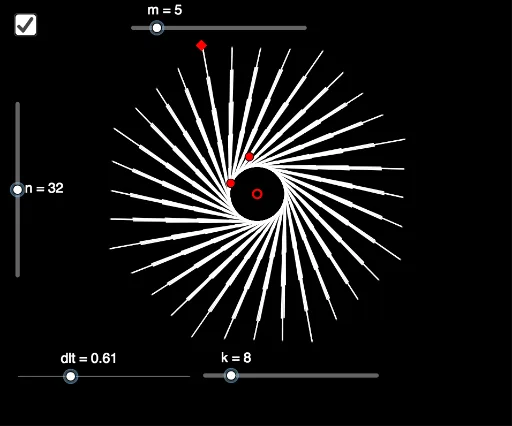
This example demonstrates how to generate polygonal starburst patterns through rotation and reflection. It involves core mathematical concepts like rotation, reflection, frequency distribution, multiplication, tree diagrams, and polygon construction. The construction uses commands Polygon and Sequence, along with objects such as D, C, k, n, m, A, B, poly1, dlt, a, L_1, L_2. It is suitable for high school mathematics education, showcasing the fun application of transformations and geometric constructions.
GeoGebra Commands & Parameters
Polygon(Sequence[Rotate[C, ((i * 360) * ° / k), D], i, 1, k]) → poly1Sequence(Sequence[Rotate[Segment[A, A + ((m - j + 1) * (B - A))], ((i * 360) * ° / n) + (((j - 1) * dlt))°, D], i, 0, n - 1], j, 1, m) → L_1Sequence(Sequence[Rotate[Segment[A, A + ((m - j + 1) * (B - A))], ((i * 360) * ° / n) - (((j - 1) * dlt))°, D], i, 0, n - 1], j, 1, m) → L_2
AI Drawing Prompt Reference
Create a polygonal starburst pattern by rotating and reflecting shapes. Start with a base polygon and rotate it around a center point multiple times to create a radial pattern. Then, reflect each edge of the polygon in both directions to form a complex starburst effect. This process demonstrates the relationship between rotation and reflection, as well as the principles of frequency distribution and geometric construction.
The prompt above was compiled from the original drawing commands and is for reference only.