
Polygon Translations and the Similarity Structure
Loading the math board and drawing, please wait…
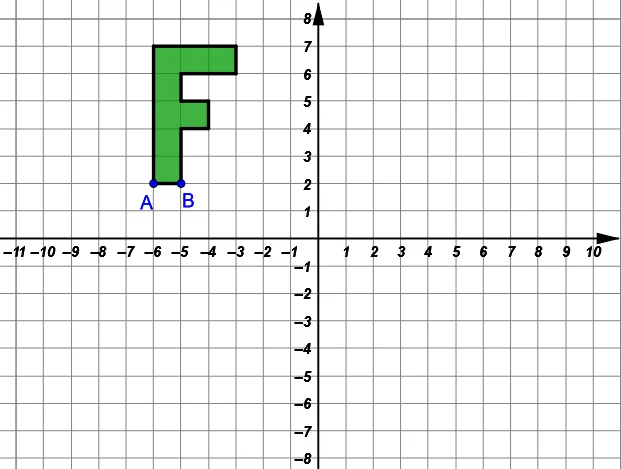
This GeoGebra example demonstrates how translating a planar figure generates a new configuration whose vertices and edges preserve geometric relationships. It emphasizes the mechanism of Translation using vectors, then uses intersection points to reveal how the translated shapes relate through corresponding geometry. Key concepts include vector-based translation (Vector and Translate), geometric construction via intersection (Intersect), polygon correspondence (Polygon), and common derived structures such as similar triangles and isosceles triangle features that arise from consistent vertex mapping. Construction highlights based on the command summary: Polygon is used to build multiple related polygons (poly1 to poly6 and their point sets), Vector defines the displacement direction between key points (e.g., A and B), Translate applies the vector to create the shifted copy (producing additional point collections like I/J, K/L, G/H, and corresponding polygons), and Intersect computes critical crossing points that support the observed relationships. Suitable for middle school geometry extension, transformation-based teaching, and contest-oriented practice focused on the workflow “transformation → correspondence → geometric property.”
GeoGebra Commands & Parameters
Polygon(A, B, 4) → poly1, f, g, h_2, i, C, DPolygon(D, C, 4) → poly2, j, k, l, m, E, FPolygon(F, E, 4) → poly3, n, p, q, r, G, HPolygon(H, G, 4) → poly4, s, t, a, b, I, JPolygon(J, I, 4) → poly5, c, d, e, f_1, K, LPolygon(K, I, 4) → poly6, g_1, h_1, i_1, j_1, M, NPolygon(N, M, 4) → poly7, k_1, l_1, m_1, n_1, O, PPolygon(G, E, 4) → poly8, p_1, q_1, r_1, s_1, Q, RPolygon(A, L, P, O, I, G, R, Q, E, B) → poly9, a_1, b_1, l_2, p_2, o, i_2, g_2, r_2, q_2, e_1Intersect(xAxis, yAxis) → SVector(S, U) → uVector(S, T) → u_1Translate(A, u_1) → A'Translate(L, u_1) → L'Translate(P, u_1) → P'Translate(O, u_1) → O'Translate(I, u_1) → I'Translate(G, u_1) → G'Translate(R, u_1) → R'Translate(Q, u_1) → Q'Translate(E, u_1) → E'Translate(B, u_1) → B'Polygon(A', L', P', O', I', G', R', Q', E', B') → poly9', a', b', l', p', o', i', g', r', q', e'Vector(S, V) → v_1Translate(A, u) → A''Translate(L, u) → L'_1Translate(P, u) → P'_1Translate(O, u) → O'_1Translate(I, u) → I'_1Translate(G, u) → G'_1Translate(R, u) → R'_1Translate(Q, u) → Q'_1Translate(E, u) → E'_1Translate(B, u) → B''Polygon(A'', L'_1, P'_1, O'_1, I'_1, G'_1, R'_1, Q'_1, E'_1, B'') → poly9'_1, a'_1, b'_1, l'_1, p'_1, o'_1, i'_1, g'_1, r'_1, q'_1, e'_1Translate(A, v_1) → A'''Translate(L, v_1) → L'_2Translate(P, v_1) → P'_2Translate(O, v_1) → O'_2Translate(I, v_1) → I'_2Translate(G, v_1) → G'_2Translate(R, v_1) → R'_2Translate(Q, v_1) → Q'_2Translate(E, v_1) → E'_2Translate(B, v_1) → B'''Polygon(A''', L'_2, P'_2, O'_2, I'_2, G'_2, R'_2, Q'_2, E'_2, B''') → poly9'_2, a'_2, b'_2, l'_2, p'_2, o'_2, i'_2, g'_2, r'_2, q'_2, e'_2Vector(A, A') → d_1Vector(A, A'') → t_1Vector(A, A''') → w_1
AI Drawing Prompt Reference
Draw a grid of similar squares by translation. Start by creating a square with points A and B, then use vectors to generate other squares, ensuring each square has the same side length as the previous one. Finally, translate points A, L, P, O, I, G, R, Q, E, and B to create a new grid of squares, observing the correspondence between the squares before and after translation.
The prompt above was compiled from the original drawing commands and is for reference only.